Why Dynamic Search Ads Are Your New Best Friend

Open up Your Google Ads Potential with Dynamic Search Ads
Google Ads dynamic search ads are an automation-driven ad type that dynamically generates headlines and landing pages based on your website content rather than predefined keywords. They’re designed to capture relevant search traffic you might miss with standard keyword campaigns.
What Are Dynamic Search Ads? Quick Overview:
| Feature | Description |
|---|---|
| Headlines | Automatically generated from your website’s page titles |
| Landing Pages | Dynamically selected based on content relevance to the search |
| Targeting | Uses your website content instead of keywords |
| Best For | Large websites, extensive product catalogs, filling keyword gaps |
| Setup Location | Found in Google Ads campaign settings under “Dynamic Search Ads” |
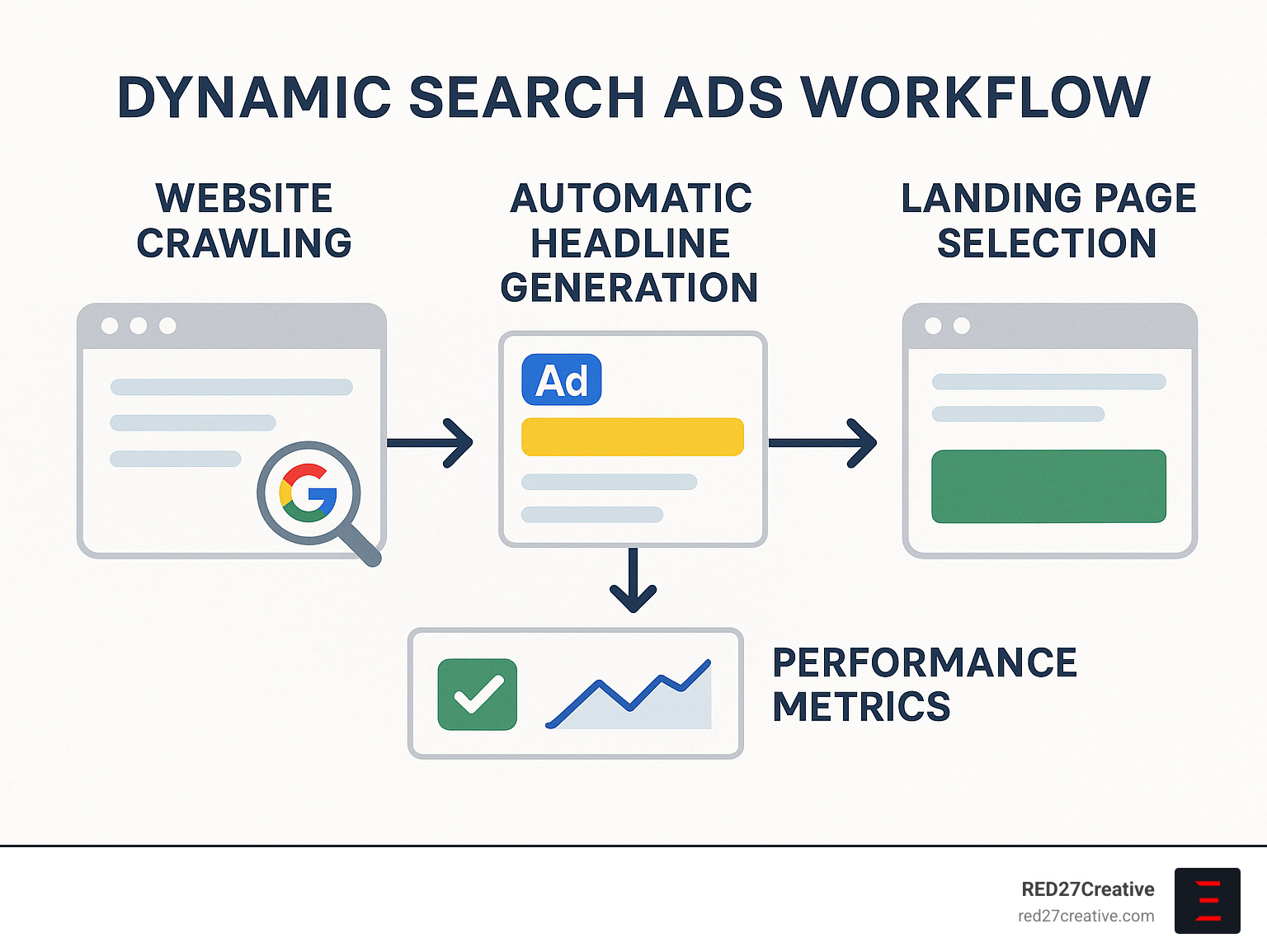
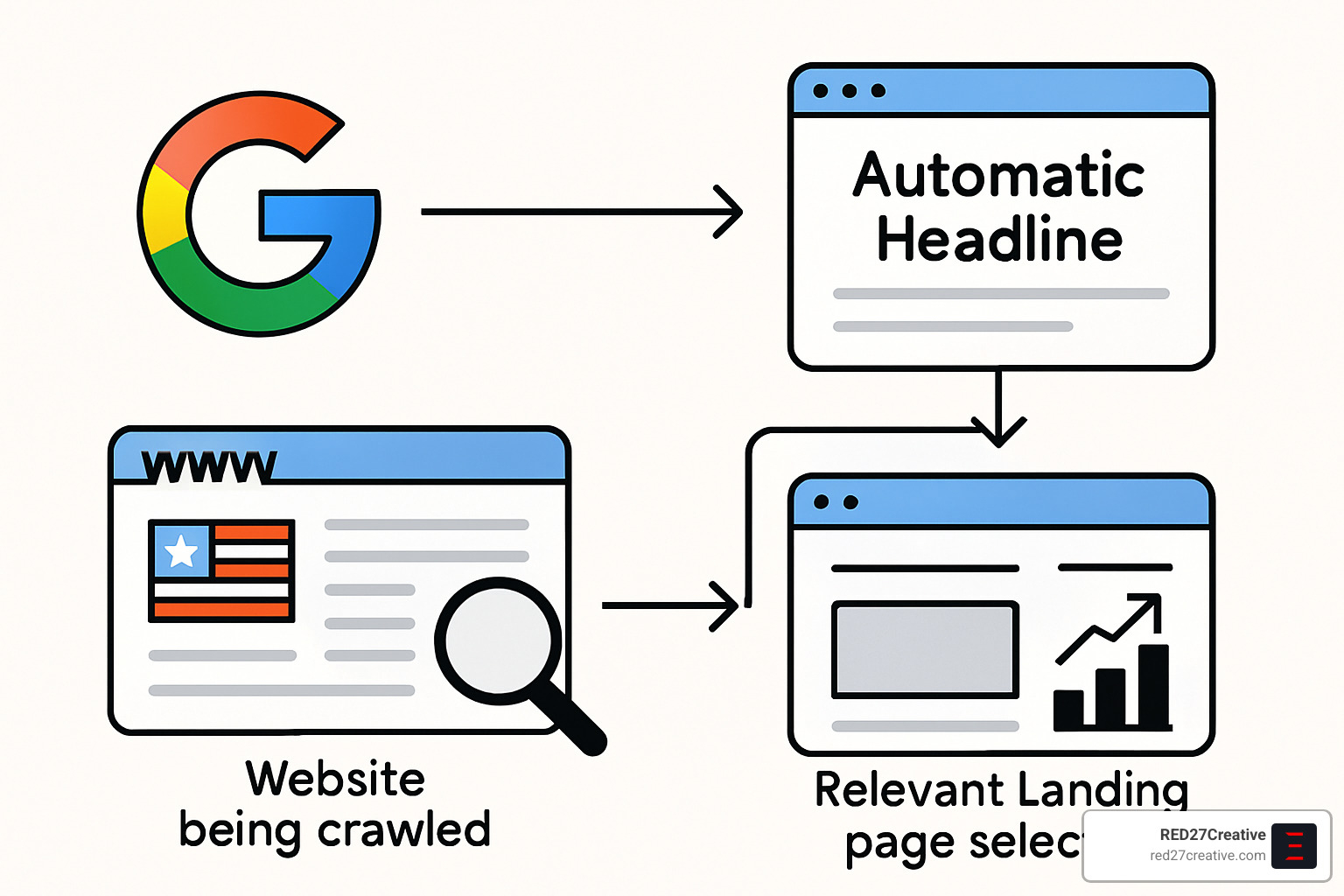
Dynamic Search Ads work by having Google crawl your website, analyze your content, and automatically create ads that match relevant searches. When someone searches for something related to your site content, Google generates a headline that closely matches their query and directs them to the most relevant page on your site.
These ads excel at:
– Capturing long-tail search queries you haven’t specifically targeted
– Saving time on keyword research and ad creation
– Automatically updating when your website content changes
– Improving relevancy between searches and landing pages
When to use them: If you have a content-rich website, want to reach more customers without extensive keyword lists, or need to complement existing search campaigns.
When to avoid them: If you need strict control over ad messaging (regulated industries), have a small or frequently changing website, or run on very limited budgets.
As Kiel Tredrea, I’ve implemented Google Ads dynamic search ads for numerous businesses seeking to scale their search presence efficiently, resulting in lower CPCs and higher relevance scores compared to traditional keyword campaigns.
Google Ads Dynamic Search Ads 101
Google Ads dynamic search ads (DSAs) represent a refreshing shift in paid search advertising. Think of them as your website’s own personal matchmaker – connecting what you offer with people actively searching for it, without all the keyword hassle.
“DSAs are the easiest way to find customers searching on Google for precisely what you offer,” according to Google. And honestly, they’re spot on. Instead of spending hours brainstorming keywords, writing headlines, and selecting landing pages, DSAs do the heavy lifting by analyzing your website and automatically creating ads that match relevant searches.
When you compare DSAs to other ad formats, the differences become clear:
| Feature | Dynamic Search Ads | Responsive Search Ads | Standard Search Ads |
|---|---|---|---|
| Headlines | Auto-generated from website | You provide multiple options | You write specific headlines |
| Landing Pages | Automatically selected | You select | You select |
| Targeting | Website content | Keywords | Keywords |
| Description Lines | You write (2 required) | You provide multiple options | You write |
| Ad Testing | System tests headlines | System tests combinations | Manual A/B testing |
| Best For | Finding new queries, large sites | Optimizing existing keywords | Specific messaging control |
What makes DSAs unique is how they connect searchers directly to your content. Unlike broad-match keywords that look for variations of a keyword, DSAs create a direct bridge between what people are searching for and what your business actually offers on your website. It’s like having a smart assistant who knows your business inside and out.
How Google Ads Dynamic Search Ads Choose Headlines
The magic behind Google Ads dynamic search ads happens when Google’s system crafts headlines that speak directly to what searchers want. This process relies heavily on your website’s structure and content, with several key factors at play:
Your HTML title tags are the star of the show here – ideally between 60-90 characters. Google also looks closely at your page content (especially headings and prominent text), meta descriptions (though these carry less weight), and even your URL structure to build compelling headlines.
When someone searches for something related to your business, Google creates a headline that matches their query and your content. For example, if someone searches “luxury hotel New York” and you run a hotel chain with NYC locations, your DSA might generate “Luxury Hotel – NYC” and direct them straight to your New York property page.
Google also ensures these auto-generated headlines maintain professional standards by applying their editorial policies – so you won’t end up with something inappropriate representing your brand.
When Google Ads Dynamic Search Ads Outperform Keywords
There are certain scenarios where Google Ads dynamic search ads absolutely shine compared to traditional keyword campaigns:
Long-tail query coverage is perhaps their greatest strength. We recently worked with a luxury furniture retailer in Chicago who was missing out on super-specific searches like “high-end walnut dining table with brass inlay” – terms too niche to predict but perfectly matched to their inventory through DSAs.
For websites with large scale content, DSAs are a game-changer. Manually creating keywords and ads for thousands of pages is practically impossible. One of our travel clients with over 20,000 property listings saw their cost per acquisition drop by 19% after implementing DSAs to automatically target their entire inventory.
Businesses with frequently changing inventory love DSAs because they automatically adjust without requiring constant campaign updates. This has been particularly valuable for our e-commerce clients in Naperville and Aurora who regularly refresh their product offerings.
Perhaps most valuable is the new keyword findy aspect. DSAs act like treasure hunters, uncovering valuable search terms you never thought to target. A B2B client of ours finded several industry-specific phrases through their DSA campaign that eventually became cornerstone keywords in their main campaigns.
As one of our clients perfectly put it: “DSAs are like having a back scratcher that reaches all the places your regular campaigns can’t.” That’s exactly the kind of relief they provide to your digital marketing strategy.
Benefits & Drawbacks You Must Know
Thinking about adding Google Ads dynamic search ads to your marketing mix? Before you dive in, let’s have an honest conversation about what makes these ads shine—and where they might trip you up.
Key Benefits:
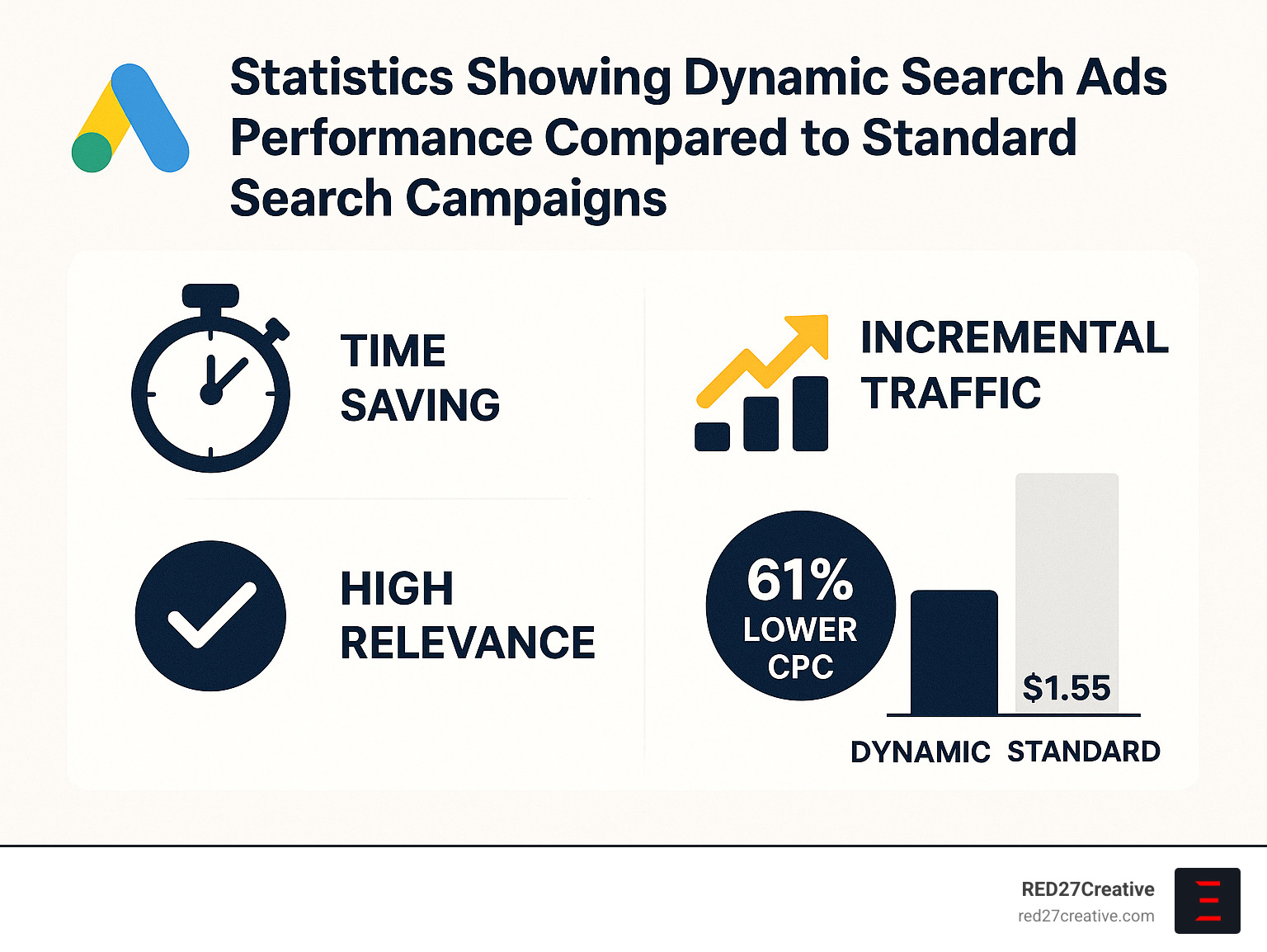
Time-saving automation is perhaps the most immediate win with DSAs. If you’re like most of our Chicago and Naperville clients, you’re already juggling too many marketing tasks. DSAs free you from the endless cycle of keyword research, headline writing, and landing page selection—giving you back hours in your week to focus on strategy instead.
High relevance is where DSAs truly excel. Since the headlines and landing pages automatically align with what people are actually searching for, your ads feel tailor-made for each user. This natural matching often translates to better click-through rates and those coveted high quality scores that can lower your costs over time.
The incremental traffic DSAs bring to the table can be substantial. They excel at capturing those relevant searches your keyword campaigns miss—those phrases you never thought to target. One of our furniture e-commerce clients was amazed to see their DSA campaign delivering clicks at $0.41 compared to $1.55 in their standard campaigns. That’s a 61% savings they immediately reinvested into scaling their business.
The new keyword findy aspect of DSAs is like having a market research tool built right into your advertising. As one of our Geneva clients put it, “Our DSAs uncovered niche service requests we never would have thought to target.” These findies can inform your entire marketing strategy, not just your paid search efforts.
When your website changes, DSAs offer automatic updates without you lifting a finger. Add a new product line or service page? Your ads can start promoting it immediately—no campaign updates required.
Potential Drawbacks:
The control limitations of DSAs can be uncomfortable if you’re used to crafting every word of your messaging. You can’t directly edit the headlines Google generates, which might leave you feeling a bit anxious about what’s being said on your behalf.
For businesses in regulated industries, compliance risks are a legitimate concern. Our financial, healthcare, and legal clients in St. Charles and Plainfield have to be particularly careful, as automated headlines might not always meet industry regulations. Extra vigilance is required here.
Cannibalization is another pitfall to watch for. Without proper boundaries between your campaigns, DSAs can start competing with your existing keyword campaigns—essentially bidding against yourself and potentially driving up costs or muddying your performance data.
Your website becomes your campaign foundation with DSAs, creating a website dependency that can be problematic. Poor page titles, thin content, or technical issues can lead to irrelevant ad matches that waste budget and disappoint searchers.
As one marketing manager from Oswego told us: “DSAs gave us incredible reach, but we had to be diligent about exclusions and negative keywords to keep them focused.”
The real magic of Google Ads dynamic search ads happens when you understand these trade-offs and implement the right guardrails—which we’ll walk through in the upcoming sections.
Setting Up Your First DSA Campaign: Step-by-Step Guide
Ready to dive into Google Ads dynamic search ads? I’ve helped dozens of businesses set these up, and while they might seem a bit technical at first, they’re actually quite straightforward once you know the steps. Let’s walk through this together:
1. Create a New Campaign
Starting fresh is always exciting! Log into your Google Ads account and click on “Campaigns” followed by that big “+ New Campaign” button. When prompted, select your campaign objective – most businesses go with “Sales,” “Leads,” or “Website traffic” depending on what you’re hoping to achieve. Then choose “Search” as your campaign type and hit “Continue” to move forward.
2. Configure Campaign Settings
Now for some personalization. Give your campaign a descriptive name (I always recommend including “DSA” so you can easily spot it later). Next, choose your bidding strategy – if you’re just getting started, Target CPA or Improved CPC work beautifully.
Set a reasonable daily budget (aim for at least 10-20× your target CPA to give Google’s system enough data to work with). Then select where you want your ads to appear geographically. Are you targeting local markets like Geneva or Aurora? Or casting a wider net? Finally, select the language that matches your target audience.
3. Enable Dynamic Search Ads
Here’s the step many advertisers miss! Under “Campaign settings,” click on “Additional settings” and look for the “Dynamic Search Ads” option. Toggle this setting on, enter your website domain, and select the language that matches your website content. This tells Google which site to crawl for generating your dynamic ads.
4. Create a Dynamic Ad Group
Time to get specific. Name your ad group something meaningful like “All Pages DSA” or “Products DSA” if you’re focusing on a particular section. Under “Ad group type,” select “Dynamic” – this is critical! Then choose your targeting source: Google’s index of your website, a page feed you upload manually, or both sources together.
5. Set Up Your Targeting
This is where the magic happens! You have several options for telling Google which pages to use:
All webpages works beautifully for smaller websites with consistently high-quality content throughout.
For more precision, try specific webpage targeting options:
– Categories (Google’s AI-generated groupings of your pages)
– URL_Contains (pages with specific text in URLs)
– URL_Equals (for targeting exact pages)
– Page title contains
– Page content contains
I recently helped a Naperville business owner target “URL_Contains=naperville-services” to focus specifically on their local service pages, and the relevance of their traffic improved dramatically.
6. Create Your Dynamic Search Ad
Click “+ New Ad” and select “Dynamic Search Ad.” Now, write two compelling descriptions (90 characters each) that showcase what makes your business special. Google will handle the headlines and final URL automatically based on the user’s search and your website content.
7. Add Negative Keywords and Exclusions
This step is crucial for refining your campaign! Add negative keywords to prevent your ads from showing for irrelevant searches. Also set up negative dynamic ad targets to exclude certain pages – typically contact pages, about pages, policy pages, or any low-converting content.
8. Review and Launch
Double-check everything one last time, then click “Save and Continue” to set your campaign live. As one of our Chicago clients told me recently, “The setup process might seem a bit hidden at first, but once you know where to find the DSA settings, it’s actually simpler than setting up traditional search campaigns.”
Targeting Toolkit Inside Google Ads Dynamic Search Ads
Let’s dig deeper into these powerful targeting options that make Google Ads dynamic search ads so flexible:
All Webpages casts the widest net by including your entire site. This works wonderfully for smaller websites with focused content. I’ve seen this approach work brilliantly for an Aurora-based service business that wanted to capture queries related to all their offerings.
Categories lets Google’s AI group your website content into themes it detects automatically. It’s like having a smart assistant organize your content into logical buckets. A furniture retailer might see categories like “Bedroom Furniture” or “Dining Sets” appear, giving them control while still leveraging Google’s intelligence.
URL Rules give you surgical precision in targeting specific sections of your website. Use URL_Contains to target pages with specific text in the URL (like “/services/”) or URL_Equals for exact page matches when you want to promote something specific.
Page Content Rules look at what’s actually on your pages, not just the URLs. You can target based on specific words in the title or body text, which is perfect for thematic campaigns.
Page Feeds offer the ultimate control for advanced users. By uploading a spreadsheet of URLs, you can organize pages by any business logic that matters to you – product category, profit margin, seasonality, or inventory status.
One of our St. Charles retail clients uses page feeds to brilliant effect, targeting only their highest-margin products during peak shopping seasons. This ensures their ad budget goes to their most profitable items when competition is fiercest.
Writing Killer DSA Descriptions
While Google handles the headlines, you’re still in charge of crafting compelling descriptions for your Google Ads dynamic search ads. With just 90 characters per description, every word must pull its weight:
Focus on benefits that make you special. A simple phrase like “Handcrafted in Illinois since 1985” tells a powerful story in just a few characters.
Include a clear call-to-action that drives immediate response. “Shop today” or “Get a free quote” gives users a direct next step.
Complement, don’t repeat potential headlines. Since you can’t predict exactly what headline Google will generate, focus on adding new information rather than potentially duplicating points.
Maintain message match between your descriptions and the pages you’re targeting. For a Plainfield home services company I worked with, descriptions like “Local experts available 24/7” reinforced their service promise perfectly.
Use promotional language carefully – terms like “best” or “guaranteed” can sometimes trigger policy flags in Google’s system.
One of our Oswego clients found tremendous success with this simple format:
– Description 1: Unique value proposition + key differentiator
– Description 2: Supporting benefits + compelling call to action
More info about Google Paid Search PPC
Best Practices to Maximize Performance
Getting the most out of your Google Ads dynamic search ads isn’t rocket science, but it does require some smart strategy. After working with dozens of businesses across Chicagoland, we’ve seen what truly moves the needle.
1. Master Negative Keywords
Think of negative keywords as your DSA campaign’s guardrails. Without them, you’re essentially giving Google free rein to show your ads for any search related to your website—not always a good idea!
Start with a comprehensive list of terms that don’t align with your business goals. One of our Naperville clients slashed wasted spend by 23% just by implementing a thoughtful negative keyword strategy. Their secret? Regular reviews of their search terms report to catch irrelevant queries early.
Common negatives to consider include “free” (unless you actually offer something at no cost), “DIY” (if you’re selling professional services), competitor names, and job-related terms (unless you’re hiring).
2. Use Negative Dynamic Targets
While negative keywords control which searches trigger your ads, negative dynamic targets control which pages on your site can be used. It’s like telling Google: “Yes, crawl my site, but please ignore these specific areas.”
Your “About Us” page might be beautifully written, but it’s probably not driving conversions. The same goes for contact pages, policies, login screens, and often blog posts (unless they’re specifically designed for conversion).
I love the approach one of our clients uses: targeting “All webpages” for maximum coverage, but then excluding specific sections with simple rules like “URL_Contains=blog” or “URL_Contains=careers.” Clean, effective, and easy to manage.
3. Optimize Campaign Structure
There’s no perfect DSA structure that works for everyone, but we’ve seen several models deliver outstanding results:
Single catch-all campaign works beautifully for smaller websites or when you’re just testing the DSA waters. It’s simple and gives you a clear performance baseline.
Category-based campaigns give you more control over budget allocation. A home services company in Chicago uses separate DSA campaigns for plumbing, electrical, and HVAC services, allowing them to adjust spend based on seasonal demand.
Performance-based structure is where the magic happens after you’ve collected enough data. Create separate campaigns for your highest-performing pages to give them dedicated budget and attention.
Funnel-stage separation helps align your DSA strategy with the customer journey. Different campaigns for awareness, consideration, and conversion pages mean you can tailor bidding strategies appropriately.
4. Improve Page Quality
Your Google Ads dynamic search ads are only as good as the pages they’re promoting. Since Google generates headlines and chooses landing pages based on your site content, improving your website directly boosts ad performance.
A Geneva retailer we work with saw a remarkable 31% jump in conversion rate after optimizing their product page titles and descriptions. Their approach was straightforward: ensure page titles are unique and descriptive (ideally 60-90 characters), include clear calls-to-action throughout, maintain mobile optimization, and regularly refresh content.
“It’s like giving Google better ingredients to work with,” their marketing director told me. “The more appetizing your website, the more delicious your ads.”
5. Leverage Ad Assets (Extensions)
Ad assets (formerly called extensions) are particularly crucial for DSAs since you have less control over the main ad text. Think of them as your opportunity to provide additional context and value.
Sitelink extensions let you showcase specific high-value pages. Callout extensions highlight key benefits like “Free Shipping” or “24/7 Support.” Structured snippets list your core offerings, while price extensions show costs directly in the ad.
For local businesses in Chicago, Batavia, and surrounding areas, location extensions are non-negotiable. They help customers find you and signal to Google that you’re relevant for local searches.
6. Accept Automated Bidding
I’ve seen too many advertisers fight against Google’s smart bidding strategies, especially with DSAs. Don’t make that mistake! DSAs and automated bidding are like peanut butter and jelly—they just work better together.
“We saw a 14% increase in conversion rate after switching our DSA campaign to Target CPA bidding,” shared one of our Plainfield service businesses. Other effective options include Target ROAS for e-commerce, Maximize Conversions when you’re working with a fixed budget, or Improved CPC if you’re just dipping your toes into automation.
Preventing Cannibalization Between DSAs & Keyword Campaigns
One of the biggest concerns I hear from clients is: “Won’t DSAs compete with my existing keyword campaigns?” It’s a valid worry, but easily addressed with the right approach.
The simplest solution is creating a shared negative keyword list containing all your exact match and phrase match keywords from standard campaigns, then applying it to your DSA campaign. This ensures DSAs only trigger for searches not already covered by your keyword campaigns.
A more sophisticated approach comes from a Chicago e-commerce client who uses a three-tiered structure:
– Tier 1: Exact match keywords for proven top-converting products
– Tier 2: Phrase and broad match modified keywords for key categories
– Tier 3: DSA campaign as a safety net to capture everything else
This strategy boosted their overall conversions by 23% without significantly increasing their budget. The key is thinking of DSAs as complementary to your keyword campaigns, not competing with them.
Monitoring & Optimizing Over Time
The true power of Google Ads dynamic search ads emerges through consistent monitoring and optimization. Set a regular schedule for campaign maintenance:
Weekly, check your search terms report to add negative keywords, review which pages are triggering ads, and monitor key performance metrics. Monthly, test different ad descriptions, adjust targeting based on performance data, and refine your bidding strategies. Quarterly, conduct deeper analysis by device, location, and audience, making structural changes as needed.
“The magic of DSAs happens when you combine their automation with strategic human oversight,” one of our Aurora clients told me after three successful years using dynamic search ads. I couldn’t agree more. Let the system do what it does best—finding relevant matches at scale—while you focus on strategic refinements that only a human can provide.
Advanced Strategies: Fitting DSAs Into Your Wider Google Ads Mix
Ready to take your advertising to new heights? Google Ads dynamic search ads aren’t just a standalone tactic—they’re a powerful piece of your comprehensive marketing puzzle. Let’s explore how to integrate them strategically into your broader advertising approach.
Performance Max Upgrade
Good news for DSA fans—Google now offers an exciting upgrade path to Performance Max campaigns. This evolution expands your reach beyond search results to include YouTube, Gmail, and Google Find.
“We saw conversions jump by nearly 18% after upgrading our DSA campaign to Performance Max,” shares a Chicago business owner we work with. The numbers back this up: advertisers typically experience over 15% increase in conversions or conversion value while maintaining similar cost efficiency.
This upgrade is particularly valuable for businesses in Naperville and Chicago looking to extend their digital footprint across multiple Google properties without managing separate campaigns for each platform.
Funnel-Based Integration
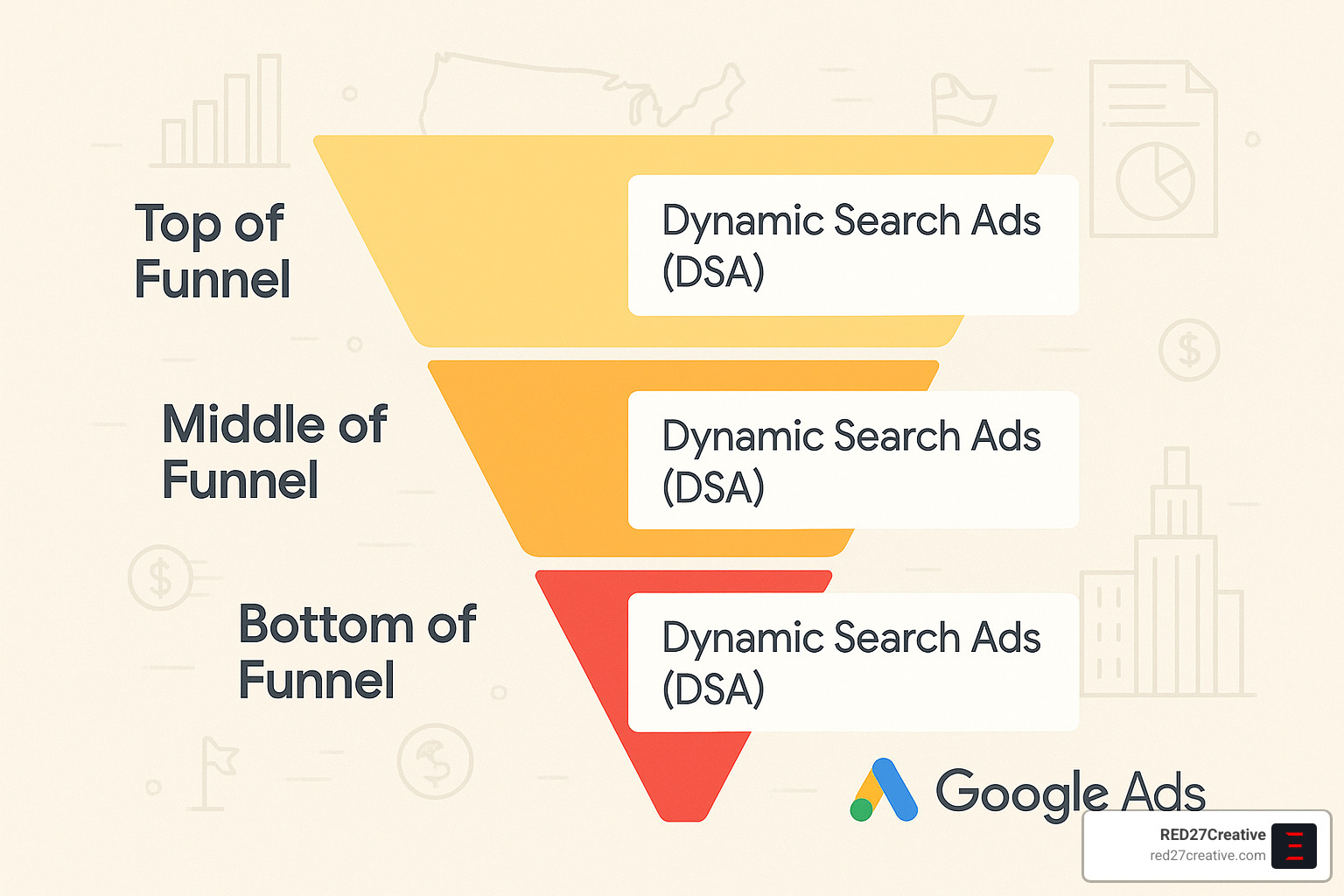
One of the smartest ways to leverage Google Ads dynamic search ads is by assigning them specific roles throughout your customer journey:
Top of funnel: Cast a wide net with broader DSA targeting to capture people in the early research phase. A St. Charles home services company we partner with uses this approach to introduce their brand to homeowners just beginning to explore renovation options.
Middle of funnel: As prospects narrow their options, more specific DSA targeting focused on comparison pages and detailed product information helps guide their decision-making process.
Bottom of funnel: For those ready to buy, highly specific DSA targeting for your conversion-focused pages can seal the deal, especially when combined with remarketing audiences to reconnect with previous visitors.
Audience Layering
Take your DSAs from good to great by applying strategic audience targeting:
Your remarketing lists are gold mines for DSA campaigns—these are people who already know your brand but haven’t converted yet. A Batavia retailer we work with saw conversion rates jump by 41% when they applied audience targeting to their DSA campaigns, focusing specifically on previous site visitors who browsed products without purchasing.
Customer match allows you to upload your existing customer lists to reach them with new offerings or complementary products. Meanwhile, similar audiences help you find new prospects who share characteristics with your best customers.
Don’t overlook in-market audiences either—these are people actively researching products or services like yours, making them particularly receptive to your DSAs.
Cross-Channel Measurement
To truly understand how your Google Ads dynamic search ads contribute to your business growth, comprehensive tracking is essential:
Connect your Google Analytics to your Google Ads account for a more complete picture of user behavior. Make sure you’re tracking all valuable actions as conversions—not just purchases, but also form submissions, phone calls, and other meaningful interactions.
Look beyond last-click attribution to understand the full customer journey. “We finded our DSA campaigns were starting many customer journeys that later converted through branded searches,” explains a Chicago business owner we support. “Without proper attribution, we would have seriously undervalued their contribution.”
Real-World Success Snapshots
Let me share some impressive results our clients have achieved with Google Ads dynamic search ads:
A luxury furniture retailer serving Chicago’s North Shore implemented DSAs alongside their standard search campaigns with remarkable results. Their DSA campaign delivered a 74% lower average CPC compared to standard search ($0.41 vs $1.55) and even outperformed their Shopping campaigns by 43% ($0.41 vs $0.73). Best of all, they captured significant new customer interest through long-tail queries they hadn’t previously targeted.
For a travel company managing over 20,000 property listings, the task of creating keywords for each destination was simply impossible. After implementing DSAs, they saw cost per acquisition drop by 19%, conversion rates climb by 14%, and finded valuable destination-specific queries they later added to standard campaigns.
A Naperville B2B service provider used DSAs as a keyword research tool on steroids. They uncovered 27 high-value industry terms they weren’t targeting, reduced their cost per lead by 32% compared to broad match keywords, and saw the quality of leads improve as they connected with highly specific professional searches.
“Dynamic Search Ads transformed our approach to Google Ads,” says the marketing director of a Geneva manufacturing company we partner with. “Instead of trying to predict every possible search, we let Google connect our content with relevant queries, then refined based on performance data.”
Frequently Asked Questions about Google Ads Dynamic Search Ads
What are Google Ads dynamic search ads and how do they work?
Ever wondered how some businesses seem to have the perfect ad for every search? That’s the magic of Google Ads dynamic search ads. These clever ads use Google’s advanced crawling technology to scan your website and automatically create custom ads based on what you actually offer.
Unlike traditional ads where you’re constantly brainstorming keywords and writing headlines, DSAs do the heavy lifting for you. When someone searches for something related to your business, Google creates a headline that matches their query and directs them to the most relevant page on your site. You just write the descriptions, and Google handles the rest – it’s like having a 24/7 marketing assistant who knows your website inside and out!
“It’s like Google becomes your ad copywriter,” as one of our Aurora clients puts it. “The system creates headlines I never would have thought of, but that perfectly match what people are searching for.”
How can I control which pages Google serves in dynamic search ads?
While the automation of Google Ads dynamic search ads is wonderful, I understand you might worry about losing control. Good news – you have several ways to stay in the driver’s seat:
Targeting options give you flexibility to choose how broad or narrow your reach should be. You can target “All webpages” for maximum coverage, or use more specific options like categories or URL rules for a more focused approach.
For more precise control, page feeds let you upload a spreadsheet of exactly which URLs you want to target. This works beautifully for our Naperville clients who want to promote specific seasonal offerings or high-margin products.
Need to keep certain pages out of your ads? Negative dynamic ad targets let you exclude specific pages or entire sections. For example, many of our Chicago clients exclude their contact pages, blogs, and career sections.
One St. Charles business owner told me: “I was hesitant about giving up control, but the targeting options actually gave me more precision than my keyword campaigns. I could focus on exactly the pages that drive revenue.”
When should I avoid using Google Ads dynamic search ads?
As much as we love Google Ads dynamic search ads, they’re not the perfect solution for every situation. Here’s when you might want to think twice:
If you’re in a regulated industry like healthcare, finance, or legal services, the automated headlines might not include required disclaimers or compliant language. Several of our Batavia financial service clients stick with traditional ads for this reason.
Got a tiny website with just a handful of pages? Traditional keyword campaigns might serve you better until your site grows. DSAs really shine when they have substantial content to work with.
Websites with constantly changing content can create inconsistent ad experiences. One Oswego e-commerce client waited until after their seasonal inventory rush before implementing DSAs.
Your DSAs are only as good as your website. If your page titles and content aren’t well-optimized, you might get irrelevant or underwhelming ads. As one client put it: “We had to clean up our website first – once we fixed our page titles, our DSA performance skyrocketed.”
Working with an extremely tight budget where every click must be carefully controlled? The broader nature of DSAs might not be ideal as your first campaign type. Start with highly targeted keywords, then add DSAs as your comfort and budget grow.
“We held off on DSAs until we completed our website redesign,” shared a business owner from Oswego. “Once our content was properly structured, DSAs became our most efficient campaign type.”
The best approach is often a mix of campaign types. At RED27Creative, we frequently help clients build a strategic combination of traditional keyword campaigns for core terms and DSAs to capture everything else – giving you the best of both worlds.
Conclusion & Next Steps
If there’s one thing I’ve learned from working with clients across Chicagoland, it’s that Google Ads dynamic search ads aren’t just another campaign type—they’re a fundamental shift in how we approach search advertising.
By now, you’ve seen how DSAs can transform your advertising approach, letting Google’s AI do the heavy lifting while you focus on strategy and optimization. The beauty of this automation lies in its ability to connect your website content directly with relevant searches, often uncovering opportunities you might never have finded manually.
Think about the time you’ll save no longer building endless keyword lists. Imagine capturing those ultra-specific long-tail queries that traditional campaigns miss. Picture your ads automatically updating as your website evolves, without you lifting a finger. These aren’t just conveniences—they’re competitive advantages in today’s digital landscape.
But as with any powerful tool, success with DSAs requires a thoughtful approach:
Start small and focused before expanding. Our most successful clients in Aurora and Naperville began with specific targeting segments, analyzed the results, then gradually widened their reach as they gained confidence.
Your negative keywords and exclusions will make or break your campaign. One Batavia client told me, “Setting up proper guardrails for our DSAs was the single most important factor in their success.”
Make website optimization part of your DSA strategy. Better page titles and content don’t just improve SEO—they directly improve how Google generates your dynamic headlines.
Don’t set and forget! While DSAs offer wonderful automation, they still need regular monitoring and refinement. The search terms report should become your weekly reading material.
At RED27Creative, we’ve seen how Google Ads dynamic search ads can drive remarkable results when implemented strategically. Whether you’re looking to complement existing keyword campaigns, uncover new market opportunities, or simply make your advertising more efficient, DSAs deserve a place in your digital marketing toolkit.
The digital landscape continues to evolve toward automation and AI-driven advertising, and DSAs represent an important step in that journey. By embracing this evolution while maintaining strategic oversight, you position your business to capture more relevant traffic while spending less time on campaign management.
Ready to transform your search advertising approach with DSAs? We’d love to help you implement these strategies as part of a comprehensive growth plan custom to your business goals.

Kiel Tredrea
https://red27creative.comTop Marketing Agency • Web, SEO & Leads • RED27Creative