Google Ads Account Management Made Simple

Mastering Google Ads Account Management for Business Growth
Google Ads account management is the process of organizing, optimizing, and maintaining your paid search campaigns to maximize return on investment. For busy executives looking to improve their digital marketing results, here’s what you need to know:
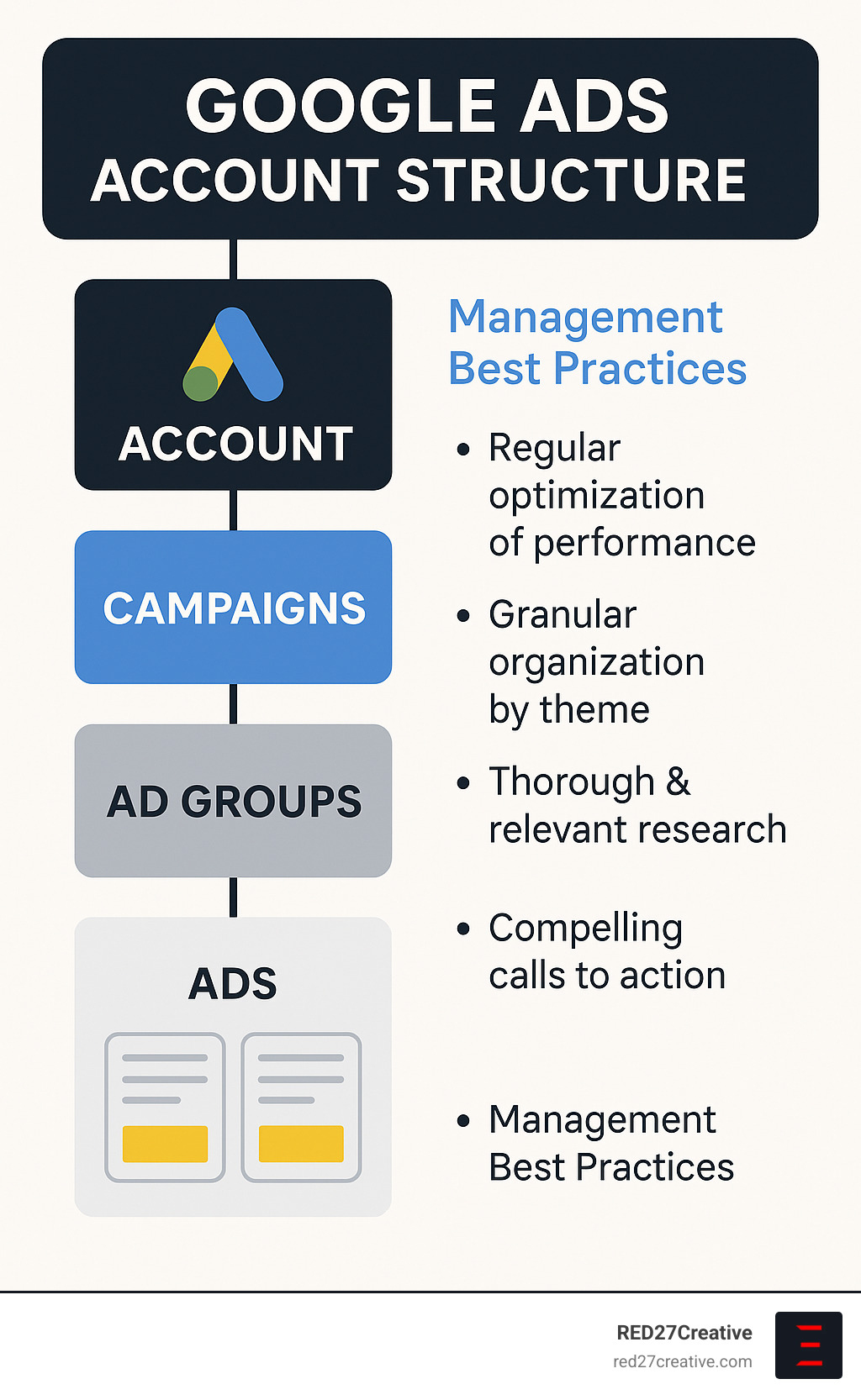
- Account Structure: Hierarchy of account → campaigns → ad groups → keywords → ads
- Regular Optimization: Weekly checks of performance metrics and budget pacing
- Access Control: Proper permission settings for team members and agencies
- Manager Accounts: Use for overseeing multiple accounts from a single dashboard
- Reporting: Track conversions, cost-per-acquisition, and ROI across campaigns
Managing Google Ads effectively can be challenging but rewarding. The average small and medium-sized business spends between $108,000 and $120,000 per year on PPC advertising, making proper account management crucial for protecting your investment and generating profitable results.
Many businesses struggle with Google Ads because they don’t understand the fundamental account structure or best practices for ongoing management. Whether you’re managing a single account or overseeing multiple accounts through a Manager account (formerly MCC), having a systematic approach is essential.
“Stop throwing money at Google Ads just to see what sticks!” This sentiment from industry experts reflects the importance of strategic account management rather than simply increasing budgets without proper oversight.
I’m Kiel Tredrea, founder of RED27Creative with over 20 years of experience in digital marketing, including comprehensive Google Ads account management services that have helped businesses transform their paid search performance from cost centers into profit-generating machines.
Google Ads account management terms to remember:
– Google Ads budget management
– Google Ads dynamic search ads
– Google Ads campaign management
What Is Google Ads Account Management?
Ever wonder what happens behind the scenes when businesses run those ads that pop up in your Google searches? That’s where Google Ads account management comes into play – the ongoing process of nurturing and fine-tuning advertising campaigns to get the best bang for your buck.
Think of Google Ads account management as tending to a digital garden. You plant the seeds (campaigns), organize them in beds (account structure), water appropriately (budget allocation), and continuously prune for optimal growth (optimization). It’s about creating a thriving ecosystem where your advertising dollars work harder for you.
A Google Ads account is your command center for running pay-per-click (PPC) advertising across Google’s vast network. From search results to YouTube videos, partner websites to mobile apps – your ads can appear virtually anywhere your potential customers might be looking.
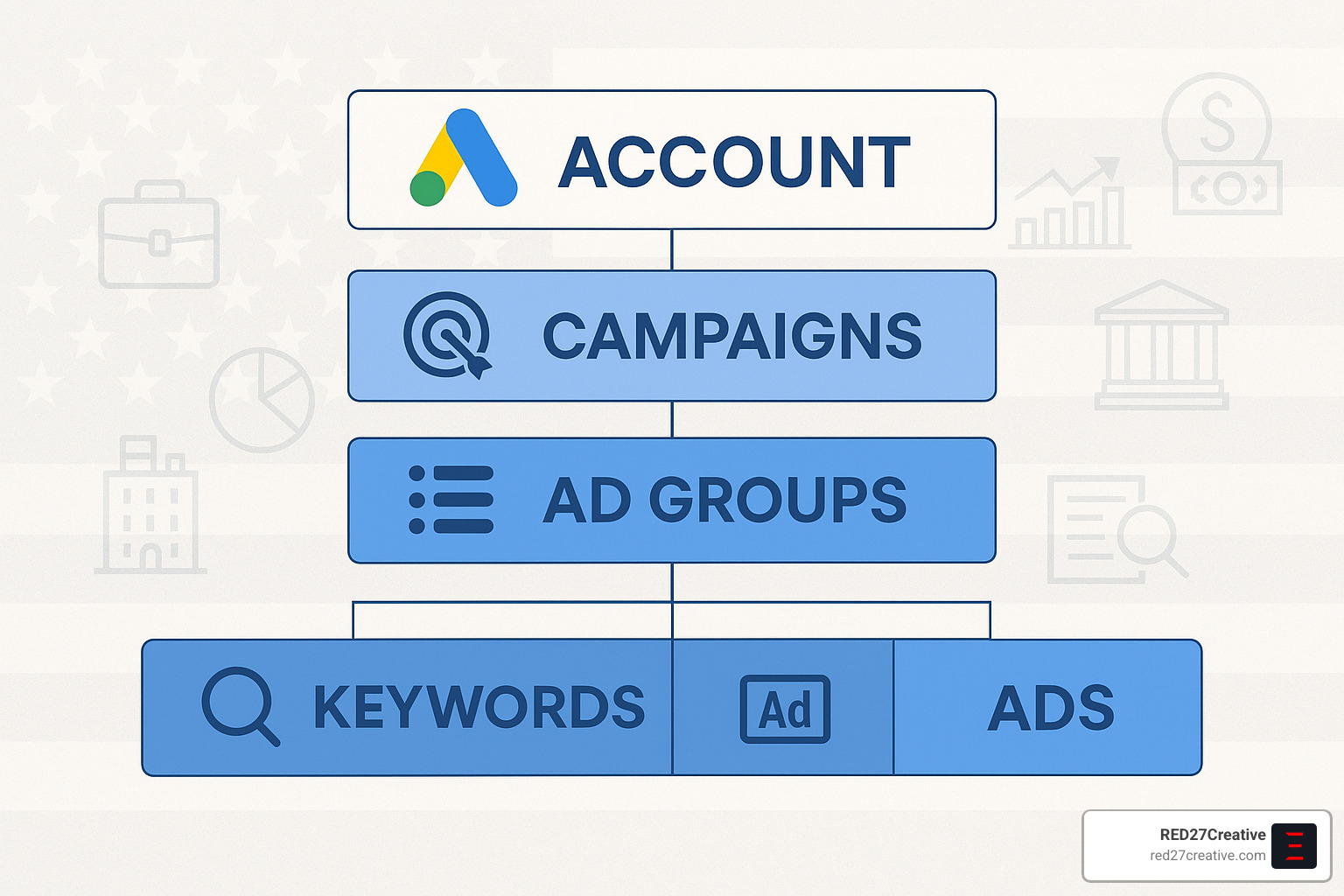
Google Ads account anatomy
Your Google Ads account has a beautiful nested structure – like those Russian dolls where each one opens to reveal another inside. Here’s how it breaks down:
- Account Level: This is your headquarters – housing all campaigns, billing details, and who gets access to what.
- Campaign Level: Where the strategic decisions happen – how much you’ll spend, where your ads will show, and what you’re hoping to achieve.
- Ad Group Level: Think of these as themed collections – groups of related keywords and ads that work together toward a common goal.
- Keyword Level: The specific search terms that trigger your ads to appear.
- Ad Level: The actual messages users see – your chance to make that crucial first impression.
Each level controls different aspects of your advertising experience:
| Level | Settings Control | Impact |
|---|---|---|
| Account | User access, billing, notifications | Overall account governance |
| Campaign | Budget, location, schedule, device | Where, when, and how much you spend |
| Ad Group | Themes, bid adjustments | Which keywords trigger which ads |
| Keyword | Match types, bids | Precise targeting of search queries |
| Ad | Headlines, descriptions, extensions | What users see and click on |
Core pillars of Google Ads account management
Successful Google Ads account management rests on several foundational elements – like the pillars holding up a temple of profitable advertising.
Budgets are your financial guardrails. They determine how much you’re willing to spend daily or monthly across campaigns. Smart budget allocation means putting more money behind what’s working and pulling back from what isn’t.
Targeting defines who sees your ads. Are you focusing on certain locations? Particular times of day? Specific devices? The more precise your targeting, the more efficient your spending.
Bidding strategies determine how you’ll compete in ad auctions. Will you manually set your maximum cost-per-click? Or let Google optimize for conversions or return on ad spend? Your choice here dramatically impacts both visibility and cost.
Conversion tracking is your scorekeeping system. Without it, you’re essentially advertising in the dark, unable to tell which ads actually drive valuable actions for your business.
Auto-tagging is a simple yet powerful feature that adds a special code (gclid) to your URLs when someone clicks your ad. This creates a digital breadcrumb trail, helping Google Analytics understand exactly which ads are driving results.
Performance goals keep you focused on what matters. Are you aiming for more website traffic? Lead generation? Direct sales? Your goals shape every decision you make within your account.
Manager account (MCC) vs standard account
As your business grows, so might your advertising needs. A standard Google Ads account works perfectly for most small to medium businesses. But what happens when you’re managing advertising for multiple business units, brands, or clients?
That’s where a Manager account (formerly known as My Client Center or MCC) comes in handy. Think of it as your advertising command bridge – a single dashboard where you can oversee multiple Google Ads accounts without constantly logging in and out.
With a Manager account, you enjoy several advantages:
– Single sign-in to access all your Google Ads accounts
– An umbrella dashboard for viewing performance across accounts
– Consolidated billing with monthly invoicing (goodbye, multiple credit card charges!)
– The ability to share assets like negative keyword lists across accounts
– Streamlined reporting that pulls data from all your accounts
Manager accounts can handle up to 85,000 linked accounts and support up to five levels of hierarchy – perfect for complex organizational structures. One email address can be associated with up to 20 Google Ads accounts (including manager accounts), giving you flexibility in how you organize your advertising empire.
For the complete lowdown on Manager accounts, check out the Manager Accounts: official guide.
Whether you’re handling a single account or juggling dozens through a Manager account, effective Google Ads account management comes down to organization, consistent optimization, and a data-driven approach. At RED27Creative, we’ve helped businesses transform their Google Ads accounts from confusing money-drains into predictable profit-generators through strategic management and ongoing optimization.
Setting Up Your First Google Ads Account & Campaign
Ready to dive into Google Ads? Setting up your first account is a bit like preparing to cook a gourmet meal—the prep work matters just as much as the ingredients! Let’s walk through this process together with a friendly approach that’ll help you avoid common pitfalls.
Step-by-step creation workflow
The journey to your first Google Ads campaign starts with a few simple steps, though don’t let their simplicity fool you—each decision shapes your advertising future!
First, you’ll need to sign in at ads.google.com using your Google account. Don’t have one? No worries! You can create one on the spot. This will be your gateway to the advertising platform, so choose an email you check regularly.
Next comes sharing your business details—your company name, website, and contact information. Google will take a peek at your website to make sure it plays by the advertising rules, so make sure your site is in good shape before starting.
When Google asks about your advertising goals, take a moment to really think about what you want. Are you hunting for sales? Chasing leads? Driving traffic? Your answer helps Google suggest appropriate settings, though I’ll let you in on a little secret in a moment.
Now for the fun part—crafting your first ad! You’ll write headlines and descriptions that make people want to click. If you’re in Smart Mode, Google will even suggest content based on your website, which can be helpful for beginners.
Then you’ll define where your ads appear geographically and set your daily budget. My advice? Start conservatively. You can always turn up the heat when you see what’s working. Think of it like testing the temperature of a pool before diving in headfirst!
Finally, you’ll review everything and add your payment details. Take one last look before hitting that launch button—it’s easier to fix things now than later.
Pro Tip: Here’s that secret I mentioned—click “Switch to Expert Mode” during setup! While Smart Mode seems easier, Expert Mode gives you the full kitchen of tools rather than just the microwave. You’ll thank yourself later when you have complete control over all those important campaign settings and targeting options.
At RED27Creative, we’ve guided countless businesses in Chicago, Naperville, and Aurora IL through this process, helping them build accounts that don’t just generate clicks, but qualified leads and sales from day one. We focus on creating a solid foundation that grows with your business. Curious about our broader approach? Check out our SEO Marketing Services.
Launch checklist for new accounts
Before you send your ads out into the wild, run through this essential checklist—think of it as your pre-flight safety check:
Add negative keywords to your campaigns—these are search terms you don’t want triggering your ads. For example, if you sell luxury watches, you might add “free” as a negative keyword to avoid people looking for freebies.
Implement ad extensions to beef up your ads with extra information. These little additions like sitelinks, callouts, and location extensions make your ads more informative and clickable without costing extra.
Connect your Google Analytics account for deeper insights. This integration helps you see what happens after people click your ads—are they bouncing right away or exploring your site?
Make sure auto-tagging is turned on in your account settings. This simple checkbox ensures accurate tracking by adding special parameters to your URLs.
Set up conversion tracking by installing the Google Ads conversion tag on your website. Without this, you’re essentially driving blindfolded—you’ll have no idea if your ads are actually generating valuable actions.
Double-check all your campaign settings before launch. A small targeting mistake could mean showing your local Chicago bakery ads to people in Tokyo!
Consider pausing your campaigns initially if you’re just setting up for future use. This prevents any charges while you’re still in the planning phase.
New campaigns need about 24-48 hours to fully activate and gather meaningful data. It’s like planting seeds—don’t dig them up too soon to check if they’re growing! Resist the urge to make major changes during this initial period.
With these steps complete, you’ll have built a solid foundation for your Google Ads account management journey. The platform might seem complex at first, but with a methodical approach, you’ll soon be navigating it with confidence!
Creating & Organizing a Google Ads Manager Account
For businesses juggling multiple Google Ads accounts—whether you’re managing different locations, product lines, or clients—a Manager account is a game-changer. Think of it as your command center that brings order to the chaos and helps you work smarter, not harder, across your advertising portfolio.
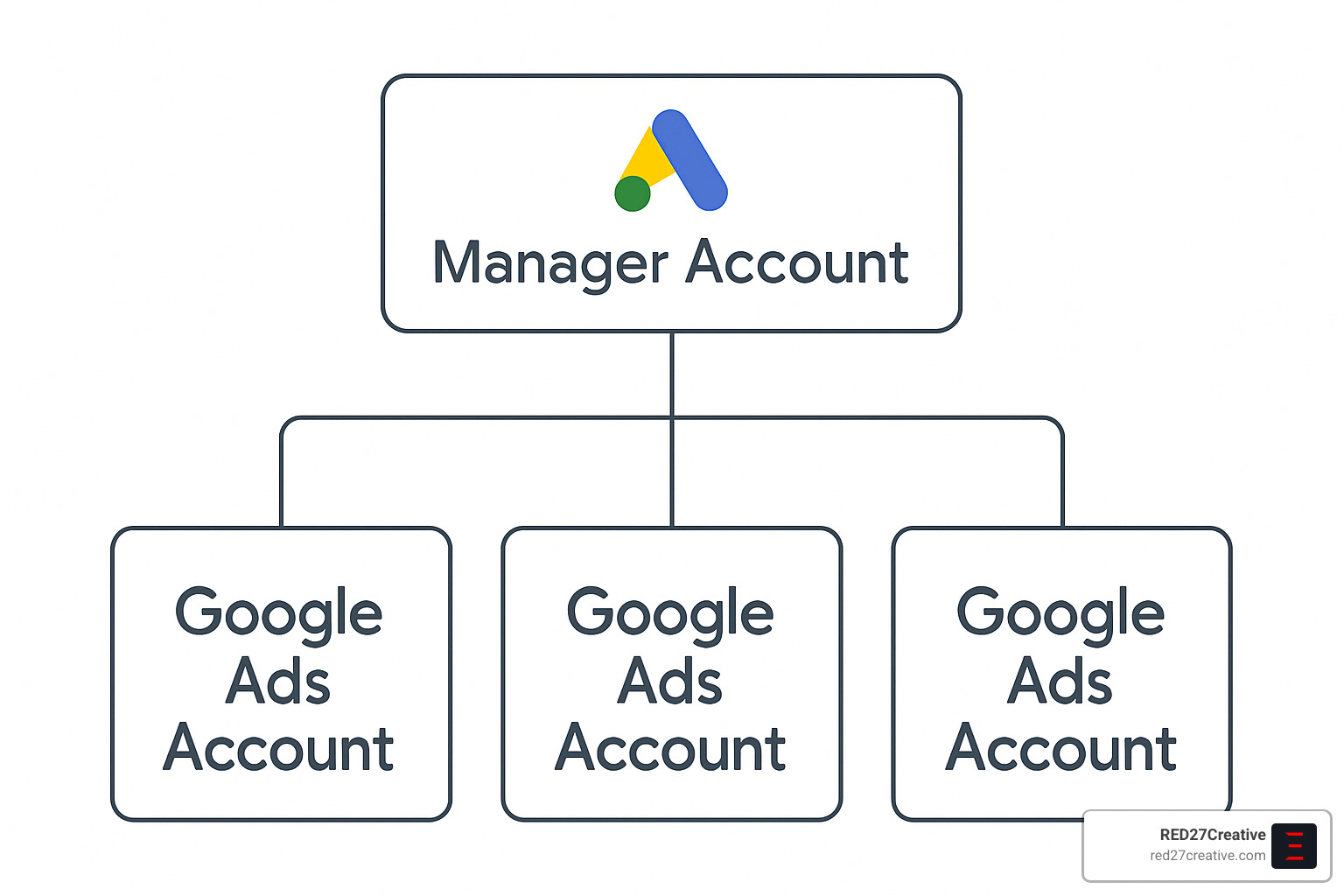
How to create a Manager account
Setting up your Manager account is refreshingly simple:
- Head over to the Google Ads Manager account homepage.
- Click “Create a manager account” and sign in with your preferred email.
- Give your account a meaningful name—something you’ll recognize six months from now!
- Select your country, time zone, and currency. Choose carefully—these settings are permanent once selected.
- Tell Google how you’ll use the account by selecting either “I’ll primarily use this account to manage my own accounts” or “I’ll primarily use this account to manage other people’s accounts with their permission.”
- Click “Explore your account” and you’re ready to roll.
Just keep in mind a few important limits: you can use the same email for up to 20 Google Ads accounts (including manager accounts), a single Manager account can handle up to 85,000 Google Ads accounts (though most of us will never reach that limit!), and you can nest Manager accounts up to 5 levels deep.
For the most up-to-date information on account limits, check out the Latest research on manager account limits.
Linking and structuring multiple accounts
Once your Manager account is up and running, you can start bringing your accounts together:
To connect existing accounts, simply go to “Settings” → “Sub-account settings” in your Manager account, click the plus button, and select “Link existing account.” Enter the customer ID for each account you want to link (one per line), and send link requests to the account owners. They’ll need to accept your request through the “Access and security” tab in their own accounts.
Creating new accounts under your Manager umbrella is just as straightforward—go to “Settings” → “Sub-account settings,” click the plus button, select “Create new account,” and follow the standard setup process.
When it comes to organizing your accounts, think about what makes sense for your business. Use descriptive labels to group accounts by client, region, or product line. Set up automated alerts so you know immediately when something needs attention. And create custom rules that work across multiple accounts to save yourself hours of repetitive work.
Best practices for Google Ads account management at scale
At RED27Creative, we’ve learned that efficiency is everything when managing multiple accounts. Here are some of our favorite strategies:
Implement cross-account conversion tracking to get a clearer picture of overall performance without counting the same conversions multiple times. This gives you a more accurate view of your true ROI.
Create shared negative keyword lists at the Manager account level so you can maintain consistent exclusions across all your accounts without having to update them individually.
Set up automated rules to handle routine tasks like adjusting bids, pausing underperforming ads, or increasing budgets for campaigns that are knocking it out of the park.
Take advantage of consolidated billing with monthly invoicing to simplify your financial management and reporting. Trust me, your accounting department will thank you!
Establish consistent naming conventions for your campaigns, ad groups, and labels. This might seem trivial, but when you’re running reports or searching for specific elements across multiple accounts, you’ll be grateful for the consistency.
Develop templates for new accounts so you’re not reinventing the wheel each time. A standardized campaign structure that you can quickly implement saves enormous amounts of time.
Schedule regular performance reviews for each account. Even with automation, nothing replaces a human review of performance data and strategic adjustments.
At RED27Creative, we manage Google Ads accounts for businesses throughout Geneva IL, Batavia IL, and the greater Chicago area. Our structured approach ensures each account gets the attention it deserves while maintaining consistency across the entire portfolio. It’s like having your cake and eating it too—individualized attention with standardized excellence.
Day-to-Day Google Ads Account Management Best Practices
Managing your Google Ads account isn’t a set-it-and-forget-it affair—it’s more like tending a garden that needs regular care to flourish. Daily and weekly attention ensures your campaigns stay healthy and continue delivering the results your business needs.
Granting, editing, and removing access
Think of your Google Ads account as your digital marketing home—you wouldn’t give everyone who visits the keys to every room, right? Managing who has access and what they can do is crucial for security and smooth collaboration.
When you need to add team members or your agency partners, the process is straightforward. Click the Admin icon (that little wrench in the corner), steer to “Access and security,” and hit the plus button to invite someone new. Here’s where you’ll make an important choice—what level of access should they have?
Admin access is like handing over the master key—they can do everything, including delete the account. Reserve this for trusted partners and key team members. Standard access allows most changes but protects critical account settings. For stakeholders who just need to see results, Read-only access lets them view without touching, while Email-only access simply sends them reports.
“I can’t tell you how many times we’ve inherited accounts where the previous agency still had full admin access,” I often tell clients. “It’s like letting your ex keep a key to your house after you’ve broken up!”
For detailed guidance on managing permissions, the Access & security guide from Google provides step-by-step instructions.
Remember to conduct regular access audits—at least quarterly—to ensure only current team members have appropriate permissions. When someone leaves your organization or you switch agencies, immediately revoke their access to protect your account.
Ongoing optimization workflow
The secret to Google Ads account management success isn’t just knowing what to do—it’s doing it consistently. At RED27Creative, we’ve developed a rhythm that keeps accounts healthy and continuously improving.
Weekly, we dive into performance metrics like click-through rates and conversion costs. This is like checking your car’s dashboard—you want to catch any warning lights before they become problems. We adjust budgets to ensure campaigns with the best returns get priority funding, and we’re ruthless about pausing underperforming keywords that drain your budget without delivering results.
Search term reports are gold mines for negative keywords. Just last month, we finded a client selling premium office furniture was getting clicks for “free office furniture”—exactly the wrong audience! Adding “free” as a negative keyword immediately improved their conversion rate.
Monthly, we take a more strategic view. This is when we refresh ad copy, explore new keyword opportunities, and refine audience targeting. It’s also the perfect time to check quality scores and make adjustments to landing pages or ad relevance.
Quality score optimization deserves special attention. Think of it as your reputation score with Google—the higher it is, the less you’ll pay for clicks. Simple tactics like ensuring your keywords appear in your ad copy, creating tightly themed ad groups (10-20 related keywords max), and using responsive search ads can significantly boost your scores and lower your costs.
Reporting & analytics across accounts
Data without insight is just numbers on a page. Effective Google Ads account management transforms raw data into actionable intelligence through thoughtful reporting.
The metrics that matter most depend on your business goals, but some universal indicators deserve attention: click-through rates tell you if your ads are compelling, conversion rates reveal if your landing pages deliver on your ad’s promise, and cost per acquisition shows if you’re acquiring customers profitably.
For businesses with multiple locations or product lines managed through separate accounts, cross-account reporting becomes essential. This is where tools like Looker Studio (formerly Data Studio) shine, allowing you to create unified dashboards that pull data from multiple sources.
“One dashboard to rule them all,” as I like to tell clients who previously juggled separate reports for each location.
Voice search is changing how people find businesses, especially for local services. If you’re managing accounts for businesses with physical locations, tracking performance on question-based keywords (“where can I find…”), mobile devices, and “near me” searches provides critical insight into this growing segment.
Common pitfalls in Google Ads account management
Even seasoned marketers can fall into traps that undermine their Google Ads account management efforts. Being aware of these pitfalls is half the battle.
Duplicate keywords across different ad groups is surprisingly common—and costly! When you bid against yourself, Google wins and your budget loses. Regular account audits can identify and eliminate this expensive redundancy.
Google’s recommendations can be helpful, but remember—Google’s primary goal is to increase ad spend, not necessarily your ROI. “Trust but verify” should be your mantra when reviewing those suggestions. We’ve saved clients thousands by critically evaluating each recommendation rather than blindly implementing them all.
Neglecting negative keywords is like leaving your windows open during a storm—unwanted traffic pours in, soaking your budget. A disciplined approach to adding negative keywords based on search term reports protects your investment.
Mobile performance often differs significantly from desktop. What works for someone researching on a laptop might fail completely for someone searching on their phone while walking down the street. Separate optimization strategies acknowledge these differences.
At RED27Creative, we’ve helped businesses throughout Oswego IL and Naperville IL avoid these costly mistakes through systematic account management. Our approach balances immediate performance improvements with long-term strategic growth, ensuring your advertising dollars work as hard as possible.
Frequently Asked Questions about Google Ads Account Management
What is the difference between a Google Ads account and a Google Ads Manager account?
Think of a standard Google Ads account as your personal advertising workspace – it’s where you build campaigns, create ads, and manage keywords for a single business. It’s perfect if you’re just managing ads for your own company.
A Google Ads Manager account (formerly called MCC) works more like a control tower that oversees multiple individual accounts. Imagine having a master dashboard where you can hop between different accounts without constantly logging in and out. This setup is incredibly helpful if you’re:
- Running separate accounts for different branches of your business
- Managing distinct brands under one corporate umbrella
- Handling advertising for multiple locations or franchises
The biggest difference is in how they’re structured – standard accounts contain campaigns, while Manager accounts contain other accounts. With a Manager account, you’ll enjoy consolidated reporting (seeing all your accounts’ performance in one view), cross-account management tools, and the convenience of a single monthly bill instead of separate charges for each account.
How does consolidated billing work inside a Manager account?
Consolidated billing is one of those features that makes life dramatically easier when you’re juggling multiple advertising accounts. Here’s the magic behind it:
When you link accounts to your Manager account, you can enable consolidated billing to receive one comprehensive monthly invoice rather than dealing with separate credit card charges for each account. Depending on your spending history and volume, Google might even offer payment terms (typically net-30), which helps with cash flow management.
The real beauty of consolidated billing comes from the simplification it brings to your accounting processes. Your finance team will thank you for providing a single organized invoice instead of dozens of separate charges. Plus, if you’re managing accounts across different currencies, the Manager account can display everything in your primary currency for easier reporting and budgeting.
At RED27Creative, we’ve seen clients save countless accounting hours after switching to consolidated billing through a Manager account. It’s especially valuable when you need to allocate advertising costs across different departments or business units.
How can I get a dedicated Google Ads account manager?
Getting personalized support directly from Google typically depends on how much you’re spending. While Google doesn’t publish official thresholds, the reality is that you’ll generally need to be investing at least $25,000-$50,000 monthly to qualify for a dedicated Google representative.
If you’re working with an agency that has Google Premier Partner status (like RED27Creative), you might benefit from improved support even at lower spending levels. Google sometimes also provides dedicated support to businesses in strategic industries or those showing exceptional growth potential.
Don’t worry if your budget doesn’t reach those levels though – you still have great options:
Partner with a specialized agency that provides dedicated account management services. A good agency becomes an extension of your team, offering the personalized attention and expertise you need without the high spending requirements Google imposes.
Use Google’s standard support channels for technical questions. While not as personalized as a dedicated rep, they can still help with common issues.
Join the Google Ads community forums where experts and fellow advertisers share knowledge and troubleshooting advice.
At RED27Creative, we believe every business deserves personalized Google Ads account management – not just those with the biggest budgets. Our team of certified experts works closely with businesses throughout Chicago IL and surrounding areas to develop customized strategies that maximize return on every advertising dollar you invest.
Conclusion
Mastering Google Ads account management isn’t just about spending money—it’s about making money. The difference between campaigns that drain your budget and those that drive real business growth often comes down to how well you manage your account day-to-day.
Throughout this guide, we’ve covered the essentials that will help you transform your Google Ads performance from merely adequate to exceptional. The fundamentals really do matter here:
A well-structured account is like a well-organized home—everything has its place, making it easier to find what you need and spot what’s not working. Take time to create logically organized campaigns with tightly themed ad groups that speak directly to your customers’ needs.
Don’t set it and forget it! The most successful advertisers I’ve worked with at RED27Creative make Google Ads optimization part of their weekly routine. A quick 30-minute audit each week paired with a deeper monthly review can dramatically improve your results over time.
Without proper conversion tracking, you’re essentially flying blind. Make sure you can see exactly which clicks turn into customers—this insight is worth its weight in gold when it comes to making smart decisions about where to invest your ad dollars.
Remember to keep a tight grip on who has access to your account. One overzealous team member with admin privileges can accidentally upend months of careful optimization. Regular access audits are a simple but effective safeguard for your account.
For those juggling multiple accounts, a Manager account (formerly MCC) is truly a game-changer. The ability to oversee everything from a single dashboard while maintaining separate strategies for different brands or locations can save hours of switching between accounts.
At RED27Creative, we’ve helped businesses throughout Chicago’s suburbs—from Geneva and Batavia to Aurora, St. Charles, Plainfield, Oswego, and Naperville—develop Google Ads strategies that don’t just drive traffic but drive growth. Our approach combines technical expertise with creative marketing to ensure every dollar you spend works as hard as possible.
Ready to take your Google Ads account management to the next level? Learn more about our Google Paid Search (PPC) services and how we can help you achieve your advertising goals.
Frequently Asked Questions about Google Ads Account Management
Let’s face it – Google Ads can feel like navigating a complex maze sometimes. I’ve gathered the most common questions I hear from clients across Chicago and the surrounding suburbs to help clear things up.
What is the difference between a Google Ads account and a Google Ads Manager account?
Think of a Google Ads account as your personal advertising headquarters. It’s where you create and manage individual campaigns, write ads, select keywords, and track performance. It’s perfect if you’re a small business managing your own digital marketing.
A Google Ads Manager account (formerly known as MCC) works more like a control tower that oversees multiple individual accounts. It’s your best friend if you’re:
– Managing advertising for several business locations
– Overseeing different brands under one company umbrella
– An agency handling multiple client accounts
The key differences are quite practical. While a standard account contains your actual campaigns, a Manager account contains other accounts. Manager accounts give you consolidated reporting (imagine seeing all your performance data in one dashboard!), powerful cross-account tools like labels and rules, and my clients’ favorite feature – consolidated billing with monthly invoicing instead of multiple credit card charges.
How does consolidated billing work inside a Manager account?
Consolidated billing is a game-changer for businesses managing multiple accounts. Here’s how it works in plain English:
When you link accounts to your Manager account, you can enable consolidated billing to receive one monthly invoice covering all your accounts instead of separate charges for each. Depending on your spending history and level, Google might even offer payment terms (typically net-30), which helps tremendously with cash flow management.
If you’re managing accounts in different currencies (hello, international marketers!), the Manager account can display everything in your primary currency, making reporting and budgeting much simpler.
The real beauty is in the flexibility – you can structure your billing hierarchy however makes sense for your business, whether that’s by department, brand, or client. This streamlines your accounting processes, reduces transaction fees, and makes it much easier to track and allocate advertising costs across your organization.
How can I get a dedicated Google Ads account manager?
Getting personalized attention directly from Google typically comes down to how much you’re spending. While Google doesn’t publish official thresholds, in my experience, advertisers usually need to spend at least $25,000-$50,000 monthly to qualify for dedicated support.
If you work with an agency that has Google Premier Partner status (like we do at RED27Creative), you might benefit from improved support even with a more modest budget. Google sometimes also provides dedicated support to businesses in strategic industries or those showing exceptional growth potential.
Don’t worry if your budget doesn’t reach those levels – you still have great options:
- Partner with a specialized agency that provides dedicated account management as part of their service
- Work with an independent Google Ads consultant for strategic guidance
- Use Google’s standard support channels for technical questions
- Join the Google Ads community forums to get advice from experts
At RED27Creative, we believe every business deserves personalized attention regardless of size. That’s why we provide dedicated Google Ads account management services for businesses throughout Chicago and the surrounding suburbs, with the same level of strategic guidance and optimization that larger advertisers receive directly from Google.
Having someone who truly understands your business goals managing your Google Ads can make all the difference between merely spending your budget and actually growing your business through strategic digital advertising.

Kiel Tredrea
https://red27creative.comTop Marketing Agency • Web, SEO & Leads • RED27Creative