How to Manage Google Ads for Your Small Business Without Going Broke

Is Google Ads Actually Worth It for Small Businesses?
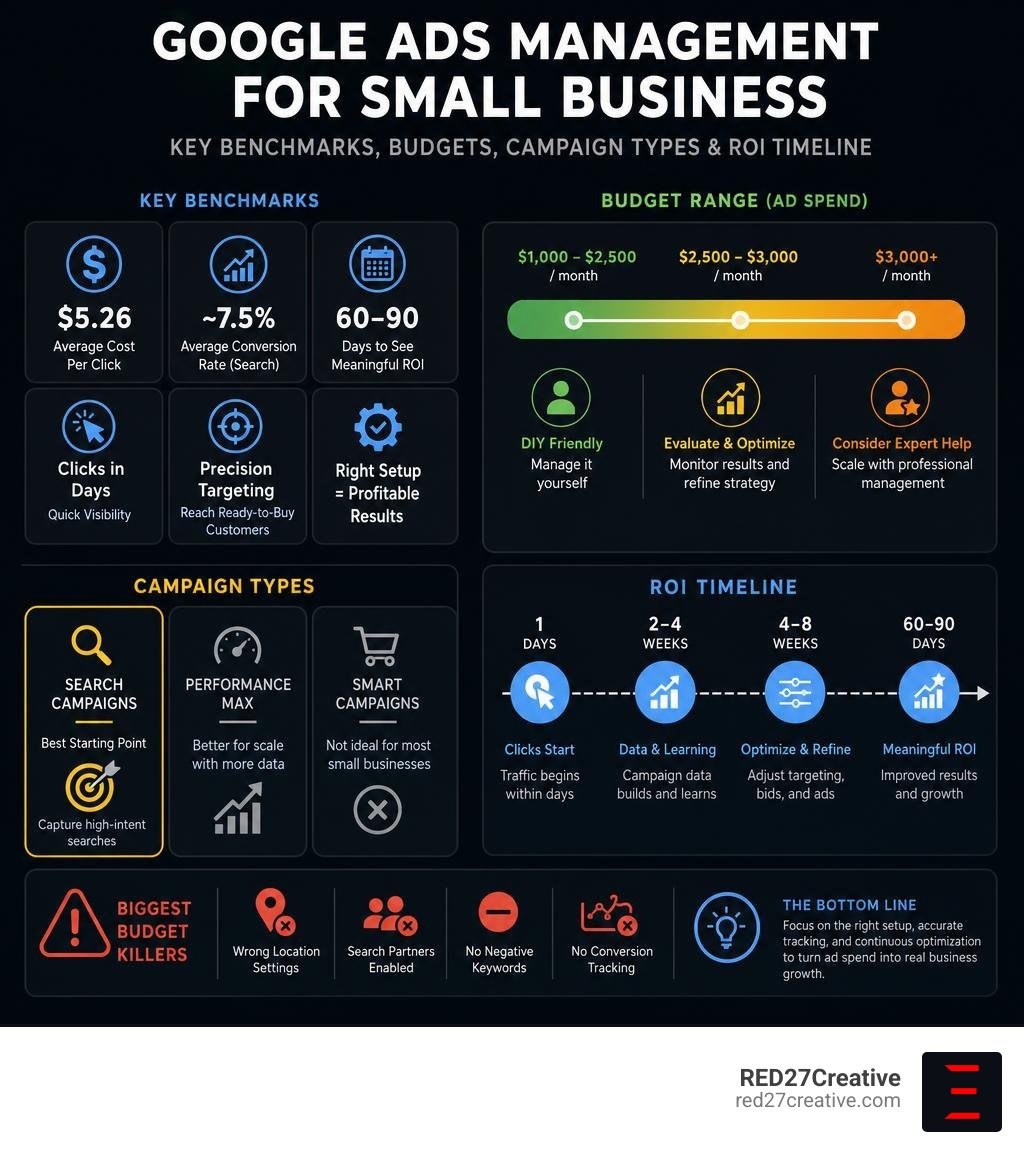
Google Ads management for small business is one of the fastest ways to get in front of customers who are actively searching for what you sell — but without the right setup, it can burn through your budget with little to show for it.
Here’s what you need to know upfront:
- Minimum realistic budget: $1,000–$2,500/month in ad spend
- Best starting campaign type: Search campaigns (not Performance Max, not Smart Campaigns)
- Average cost per click: $5.26 across all industries
- Average conversion rate: ~7.5% for search campaigns
- Time to see results: Clicks within days; meaningful ROI in 60–90 days
- Biggest budget killers: Wrong location settings, Search Partners enabled, no negative keywords, no conversion tracking
- DIY vs. agency threshold: Under $2,000/month, manage it yourself; above $3,000/month, consider professional help
The platform is powerful. But it’s also unforgiving. Google’s default settings are built for large advertisers with massive data volumes — not a local service business spending $50 a day. The difference between a profitable campaign and a money pit almost always comes down to how the account is configured, not whether Google Ads works.
I’m Kiel Tredrea, founder of RED27Creative and a marketing strategist with over 20 years of experience building lead generation systems — including google ads management for small business clients across a wide range of industries. In the sections below, I’ll walk you through exactly how to set up, manage, and optimize your campaigns without wasting money on mistakes that are entirely avoidable.
Google ads management for small business terms you need:
The Reality of Google Ads Management for Small Business Budgets
Many small business owners in the Chicago suburbs — from local contractors in Batavia to professional service providers in Naperville — jump into Google Ads expecting immediate, massive returns. They hear industry statistics showing that businesses earn an average of $8 in profit for every $1 spent on Google Ads and Search.
However, this average includes organic search value and massive corporate campaigns. For a local startup or small business, pay-per-click (PPC) advertising requires a structured, scientific approach to achieve a strong return on ad spend (ROAS). Without a clear grasp of how your budget translates to clicks, you can easily exhaust your monthly ad spend in a matter of days. This is especially true when launching PPC for Startups, where initial capital is limited and every dollar must prove its worth.
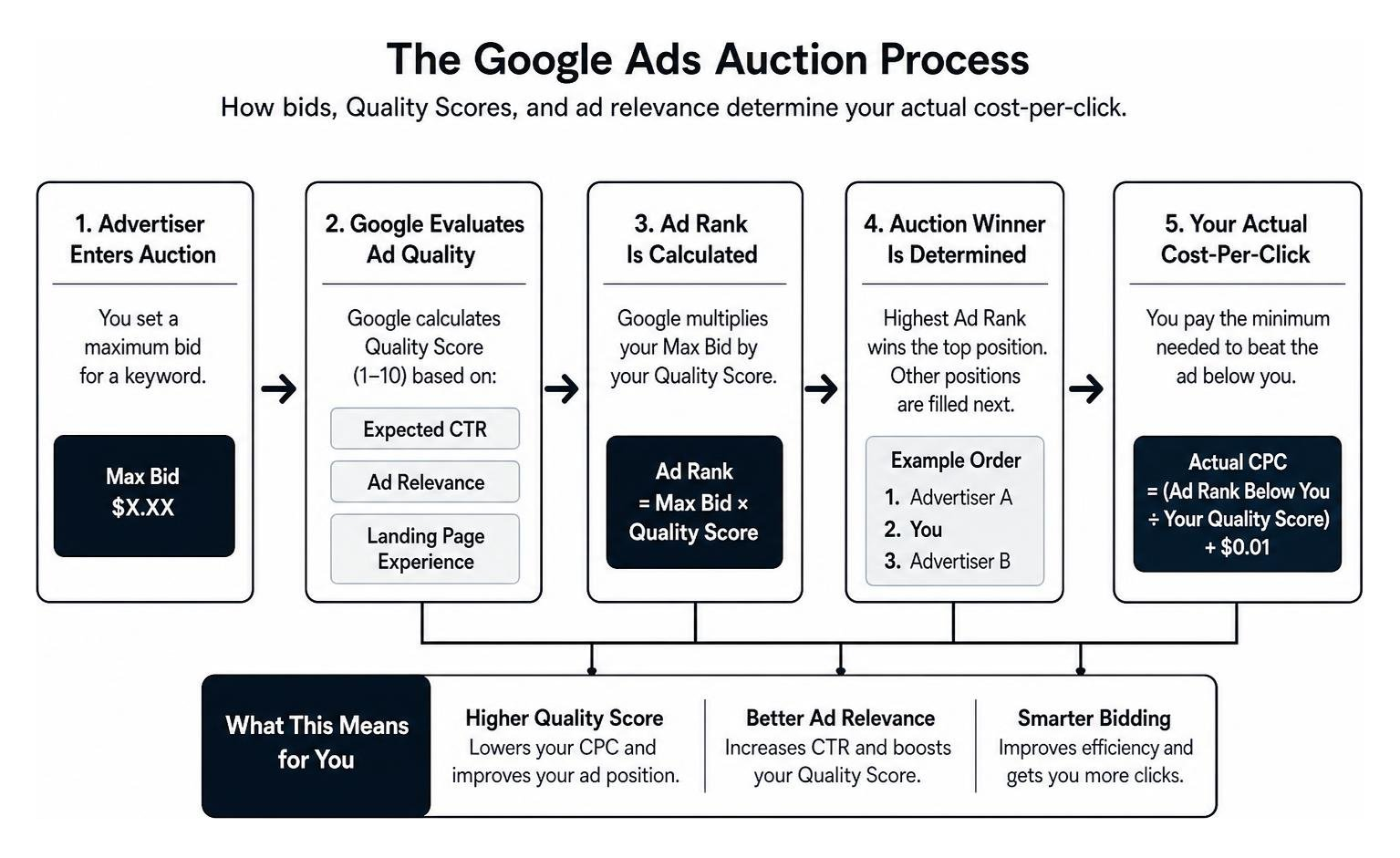
To help you decide where to allocate your marketing dollars, let’s look at how Google Ads stack up against social media platforms like Meta (Facebook and Instagram).
| Feature | Google Ads (Search) | Meta Ads (Facebook/Instagram) |
|---|---|---|
| Primary User Intent | High Active Intent (Searching for a solution right now) | Passive Discovery (Browsing content based on interests) |
| Targeting Method | Keywords, search queries, and location | Demographics, interests, and behaviors |
| Average Conversion Rate | ~7.5% (Search Network) | ~1% to 3% (Industry dependent) |
| Best Used For | Immediate lead generation and high-value sales | Brand awareness, visual products, and retargeting |
| Cost Per Click (CPC) | Higher ($2 to $15+ depending on industry) | Lower ($0.50 to $3.00 on average) |
Setting a Realistic Starting Budget for Google Ads
While Google will gladly let you experiment with tiny daily budgets like $10 per day, this is a recipe for frustration. At a $10 daily budget, and with an average industry CPC of $5.26, your ad will only get clicked twice a day before turning off. That is simply not enough data for Google’s algorithm to learn, let alone for you to secure a consistent stream of leads.
For most small businesses, a realistic starting budget is $1,000 to $2,500 per month in ad spend (roughly $33 to $83 per day). This daily budget ensures you can secure at least 10 to 15 high-intent clicks daily. Over a 30-day testing phase, this volume generates the critical data required to optimize your bids, adjust your targeting, and identify which search terms are actually driving phone calls and form submissions. If you want to Reach Customers Across YouTube & Search – Google Ads effectively, you must give the system enough financial runway to gather meaningful user signals.
Google Ads vs. Meta Ads: Intent vs. Discovery
The fundamental difference between Google and Meta comes down to user intent. When someone searches Google for “emergency plumber near me,” they have an immediate, high-intent need. They are actively looking to buy, and they are highly likely to call the first reputable business that appears. This is “pull” marketing.
Meta Ads, on the other hand, is “push” marketing. A user scrolling through their Instagram feed isn’t actively looking for a plumber. While Meta is fantastic for visual products, demographic targeting, and building long-term brand awareness, Google Ads is the undisputed king of immediate buyer readiness and high conversion rates.
Choosing the Right Campaign Type to Avoid Wasted Spend
Google offers several different campaign types, and choosing the wrong one is the fastest way to drain your budget. When you set up a new account, Google’s default interface will nudge you toward automated, simplified options. While these automated setups promise ease of use, they often rob you of the control you need to protect a limited budget.
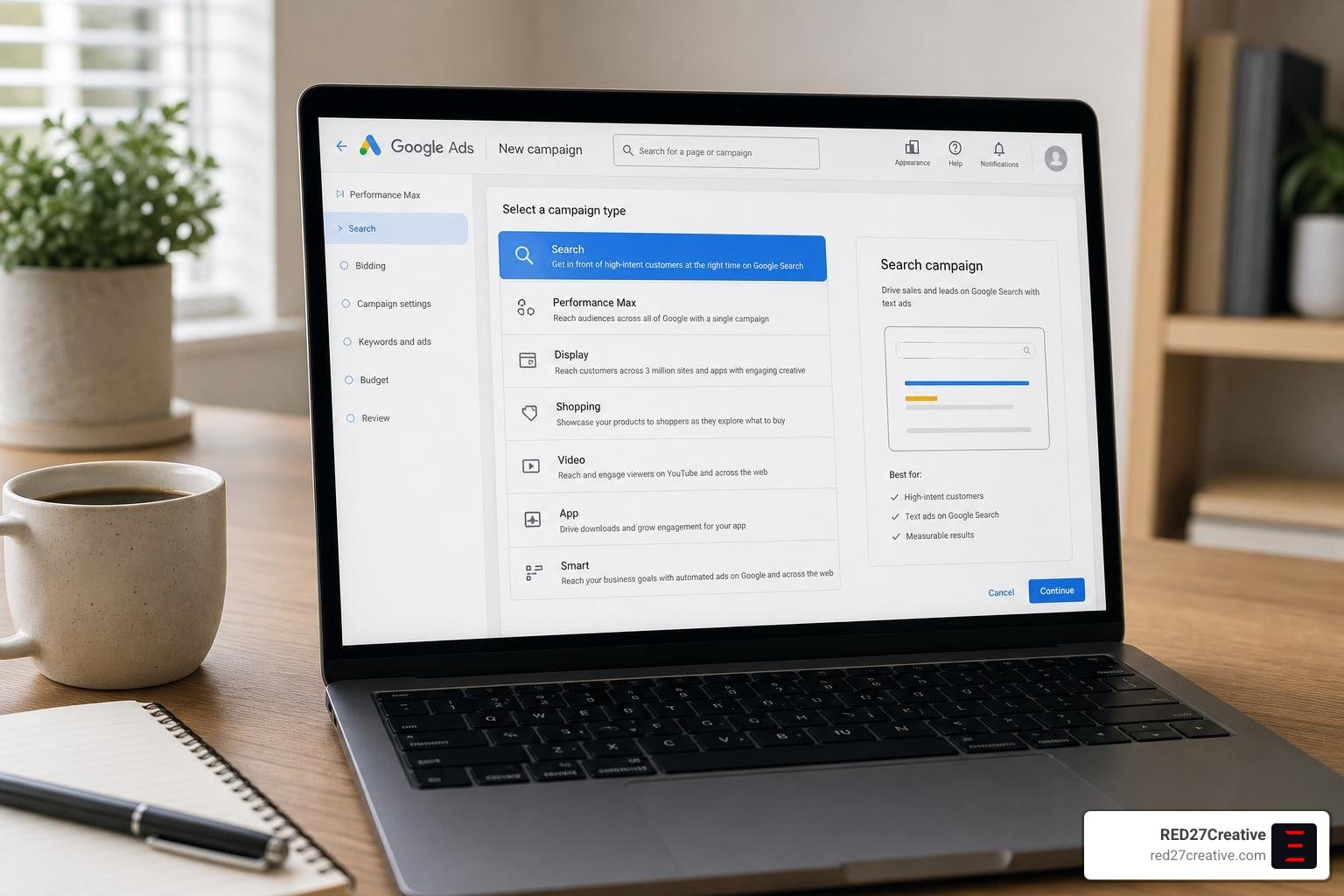
For most local service and professional businesses, your campaign strategy should be highly focused. If you want to keep your costs low and your lead quality high, you need to understand which campaigns to run and which ones to skip. For a deeper dive into structuring these campaigns, check out our guide on Google Ads Campaign Management.
Why Search Campaigns Are the Best Google Ads Management for Small Business Strategy
Standard Search campaigns are the absolute bread and butter of any successful google ads management for small business strategy.
Search campaigns allow you to display text ads to users at the exact moment they type a specific query into Google. This gives you complete control over:
- Keywords: You choose exactly which phrases trigger your ads.
- Match Types: You can restrict your ads to “phrase match” or “exact match” to prevent Google from showing your ads for irrelevant, broad terms.
- Ad Groups: You can organize your keywords into tight, highly relevant themes (e.g., creating one ad group for “commercial roofing” and another for “residential roof repair”).
By focusing strictly on high-intent search queries, you ensure that every dollar of your ad budget is spent on users who are actively looking to hire a business like yours today.
The Truth About Performance Max on a Limited Budget
Performance Max (PMax) is Google’s flagship AI-driven campaign type. It automatically distributes your ads across all of Google’s networks, including Search, YouTube, Display, Maps, Gmail, and Discover.
Google claims that advertisers using Performance Max see an average 18% increase in conversions at a similar cost per action compared to previous campaign types. However, there is a major catch for small businesses.
Performance Max relies heavily on machine learning. To optimize effectively, the AI algorithm needs a high volume of conversion data — typically at least 30 conversions per month per campaign.
If your budget is under $3,000 per month, you likely won’t generate enough conversion volume for the AI to learn what a “good” lead looks like.
Without those data signals, PMax can quickly become a budget-wasting machine, buying low-quality traffic on mobile apps and display websites instead of high-intent search clicks. For small budgets, stick to Search campaigns first.
The Silent Budget Killers: Settings That Drain Your Cash
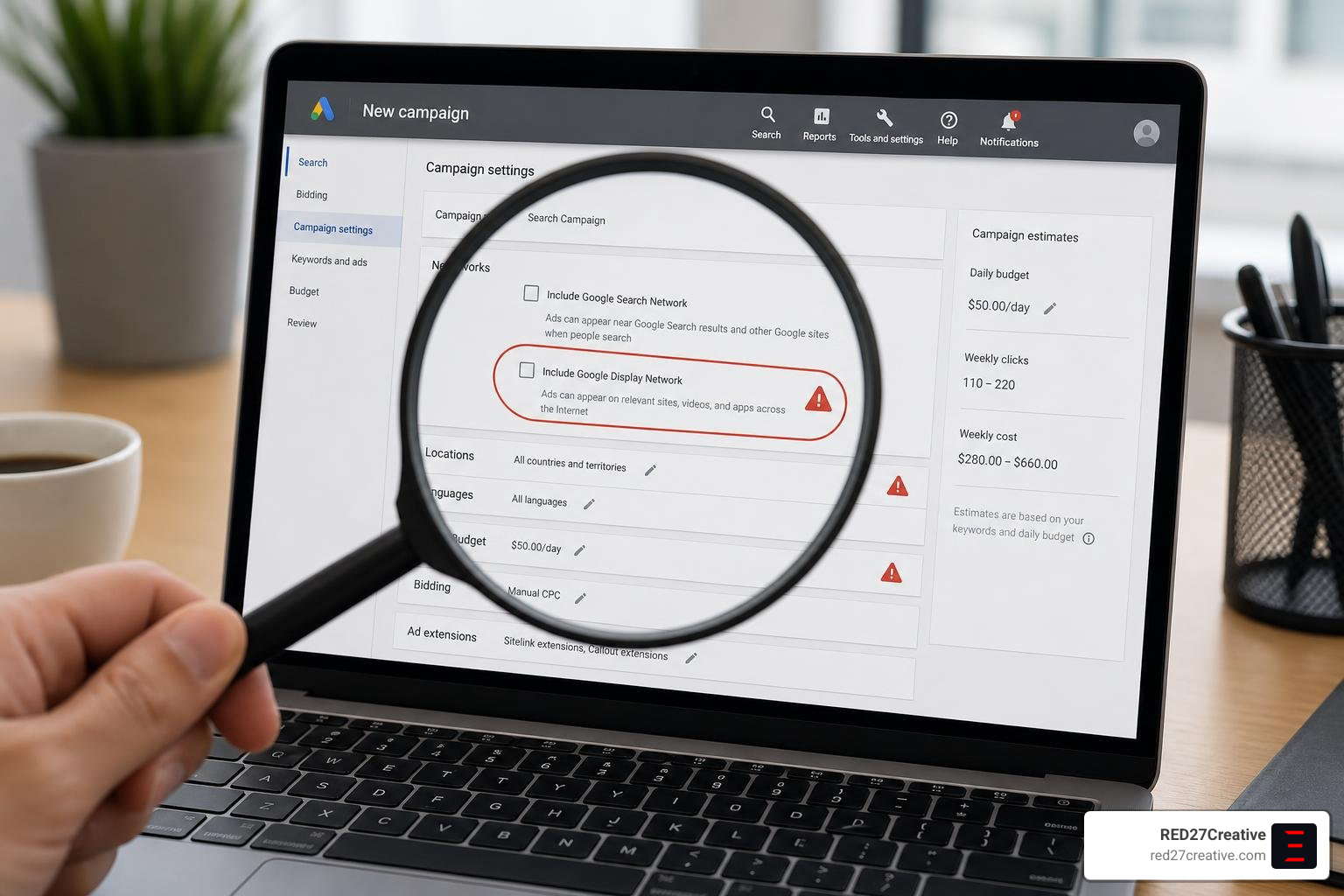
When you set up a Google Ads campaign, Google pre-selects several “recommended” default settings. While these settings make sense for enterprise-level brands with unlimited budgets, they can be absolutely catastrophic for small businesses. If you don’t manually turn these options off, you could easily waste 30% to 50% of your daily budget on clicks that will never convert. To see how professional management eliminates these leaks, read about our Affordable Google Ad Management Services That Actually Work.
Disabling Default Settings That Waste Money
Let’s look at the three most expensive default settings in Google Ads and how to fix them immediately:
- The Display Network Expansion: When creating a Search campaign, Google will check a box that says “Include Google Display Network.” This allows Google to show your text ads on millions of third-party websites and mobile apps when you have leftover daily budget. This traffic has incredibly low intent. The Fix: Uncheck “Include Google Display Network” during setup. Keep your Search campaign strictly on the Search Network.
- The “Presence or Interest” Location Setting: Google’s default location setting targets “People in, regularly in, or who’ve shown interest in your targeted locations.” This means someone sitting in London searching for “Chicago hotels” could trigger your local plumbing ad. The Fix: Change the location target setting from “Presence or interest” to “Presence: People in or regularly in your targeted locations.”
- Auto-Apply Recommendations: If you leave “Auto-apply” enabled, Google’s AI will make changes automatically without your permission. These recommendations are designed to increase Google’s ad revenue, not necessarily your ROI. The Fix: Go to the “Recommendations” tab, click “Auto-apply” in the top right corner, and uncheck all boxes.
The Importance of Negative Keywords and Search Term Hygiene
Another massive budget drain is failing to manage your negative keywords. If you bid on the phrase match keyword "divorce attorney", your ad could easily show up when someone searches for "free divorce attorney" or "divorce attorney salary." If you are a private law firm, you do not want to pay $10 for a click from someone looking for free legal aid.
To prevent this, you must build a robust negative keyword list before your campaign goes live. Common negative keywords for small businesses include:
- “free”, “cheap”, “DIY”, “how to”
- “jobs”, “salary”, “hiring”, “resume”
- “class”, “school”, “training”, “books”
Once your campaign is running, you should review your Search Terms Report every single week. If you spot any irrelevant queries, add them as negative keywords immediately to protect your remaining budget.
Setting Up Conversion Tracking That Actually Matters
If you run Google Ads without conversion tracking, you are essentially flying blind. You will know exactly how much money you spent and how many clicks you received, but you will have absolutely no idea which keywords or ads actually generated phone calls, form fills, or sales. Without this data, you cannot optimize your campaign, and Google’s Smart Bidding algorithms cannot work. For a complete blueprint on setting up a high-performing tracking system, consult our Google Ads Management Complete Guide.
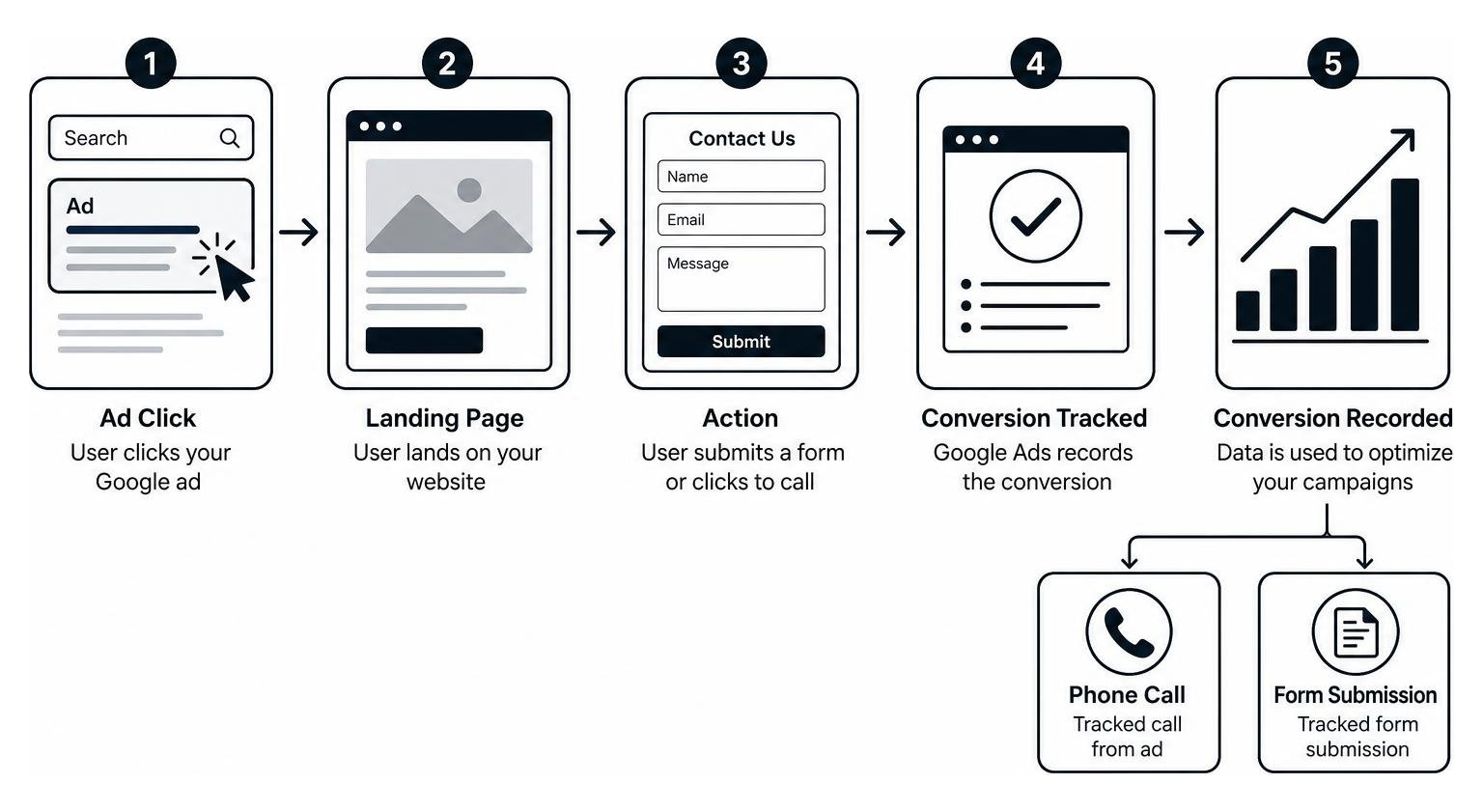
Tracking Leads, Calls, and Sales Accurately
To measure what actually matters for your small business, you need to track three primary conversion actions:
- Form Submissions: When a user clicks your ad, lands on your website, and fills out a contact or quote request form.
- Phone Calls from Ads: When a user clicks the call extension directly on your mobile ad without even visiting your website.
- Phone Calls from Website: When a user clicks your ad, visits your website, and dials the phone number displayed on your page. To track this, you must use dynamic number insertion (DNI), which swaps your website’s phone number with a unique tracking number tied to the Google Ads click.
To set this up cleanly, we highly recommend integrating your Google Ads account with Google Analytics 4 (GA4) and Google Tag Manager (GTM). By implementing Enhanced Conversions, you can feed secure, hashed first-party customer data back into Google’s machine learning model. This helps the platform target higher-value users with greater accuracy.
Why Your Landing Page Dictates Your Google Ads Success
You can build the most perfect Google Ads campaign in the world, but if you send that paid traffic to a poorly designed website, your campaign will fail. A Google ad is only as good as its landing page. If you send traffic to your homepage, users will often get confused by the amount of information, fail to find what they were looking for, and bounce back to Google.
Instead, you should direct your ad traffic to a dedicated, conversion-rate optimized landing page. A high-converting landing page should feature:
- A Clear Headline: This headline must directly match the message of the ad the user clicked (e.g., “Emergency Water Heater Repair in Geneva”).
- A Single, Obvious Call to Action (CTA): Give users one clear path to take, such as a prominent “Call Now” button or a simple 3-field contact form.
- Mobile Optimization: Over 70% of local service searches happen on mobile devices. If your landing page loads slowly or is hard to navigate on a smartphone, you will lose leads instantly.
- Trust Signals: Include clear customer reviews, business credentials, and local trust badges.
Optimizing your landing page not only increases your conversion rate, but it also improves your Google Quality Score. A higher Quality Score lowers your actual cost-per-click, allowing you to secure more leads for the exact same budget.
Industry Benchmarks: What Does Success Look Like?
To understand whether your campaign is performing well, you need to compare your metrics against established industry benchmarks. While every local market has its own nuances, having a baseline helps you identify if your cost-per-click or cost-per-lead is within a healthy range. To see how we structure campaigns to beat these averages, explore our Google Ads Management Services.
Average CPC and CPL Benchmarks Across Small Business Industries
Here is a look at the average cost-per-click (CPC) and cost-per-lead (CPL) benchmarks for common small business industries, based on historical campaign data:
- Home Services (Plumbing, HVAC, Roofing): Average CPC: $7.85 | Average CPL: $90.92
- Professional Services (Accounting, Consulting): Average CPC: $5.58 | Average CPL: $103.54
- Real Estate: Average CPC: $2.53 | Average CPL: $100.48
- Healthcare & Fitness: Average CPC: $5.00 | Average CPL: $62.80
- Attorneys & Legal Services: Average CPC: $8.58 | Average CPL: $131.63
- Restaurants & Hospitality: Average CPC: $2.05 | Average CPL: $30.27
That these are nationwide averages. In highly competitive local markets like Chicago and the surrounding suburbs, CPCs can easily double during peak seasons.
This is why maintaining tight geographic targeting and a high Quality Score is absolutely vital to keeping your costs manageable.
How to Use AI Tools for Smarter Google Ads Management for Small Business
In 2026, artificial intelligence has become deeply integrated into the Google Ads platform.
For small business owners managing their own accounts, Google’s new Gemini-powered Ask Advisor in Google Ads (beta) – Google Ads Help acts as a free, built-in conversational assistant.
You can use this tool directly inside your account to brainstorm high-converting ad headlines, troubleshoot disapproved ads, and run quick diagnostic checks on your mobile performance.
Additionally, many small businesses use external AI optimization tools like Soku to help manage their accounts. Soku offers Google Ads Management — Without the Agency Retainer | Soku | Soku , utilizing automated scripts to run continuous search-term hygiene and catch budget leaks.
While these AI tools are excellent for routine maintenance, they are only as good as the guardrails you set. Always review any AI-generated ad copy or keyword suggestions before letting them go live.
DIY vs. Hiring an Agency: When to Make the Switch
As a small business owner, your time is your most valuable asset.
When you are first starting out, managing your own Google Ads campaign can be a great way to understand the platform and learn what keywords drive your business.
However, as your business grows, the time required to monitor search terms, test ad copy, and adjust bids can quickly become overwhelming. To help you navigate this decision, read our guide on How to Pick a Google Ads Campaign Management Service Without Getting Burned.
Managing Google Ads Yourself: Pros and Cons
Managing your own PPC campaigns comes with a distinct set of trade-offs:
- The Pros: You save money on agency management fees, giving you more capital to put directly toward ad spend. You also retain 100% control over your messaging and have a direct pulse on what search queries your customers are using.
- The Cons: The learning curve is steep. You have to dedicate at least 3 to 5 hours per week to account maintenance, keyword research, and search term hygiene. If you get busy running your business and stop monitoring the account, a sudden shift in competitor bidding or a broad-match keyword leak can easily burn through hundreds of dollars in a single weekend.
When Does It Make Sense to Hire a Professional?
As a general rule of thumb, the decision to hire a professional agency or specialist comes down to your monthly ad budget:
- Ad Spend Under $1,500/Month: It rarely makes sense to hire a traditional agency. If an agency charges a $500 to $1,000 monthly retainer to manage a $1,000 ad spend, that fee acts as a 50% to 100% tax before a single click is even generated. In this phase, you are better off managing the campaign yourself or using automated AI tools.
- Ad Spend Over $2,500/Month: At this level, hiring a professional pay-per-click specialist becomes highly cost-effective. A skilled manager will easily recover their fee by identifying wasted spend, improving your Quality Scores to lower your CPC, and building custom landing pages that double your conversion rates.
Frequently Asked Questions about Google Ads for Small Businesses
What is the minimum budget for a small business to see results on Google Ads?
For most local small businesses, a realistic minimum budget is $1,000 to $2,500 per month in ad spend (roughly $33 to $83 per day). This budget ensures you can afford 10 to 15 high-intent clicks daily, providing enough conversion data for the system to optimize effectively.
How long does it take for a Google Ads campaign to become profitable?
While you will start receiving clicks within hours of launching, a campaign typically requires a 60-to-90-day optimization period to become consistently profitable. During the first 30 days, you are gathering data and identifying wasted spend; by month two and three, you are scaling winning keywords and optimizing your landing pages for maximum ROI.
Why is my Google Ads campaign spending money but not generating leads?
This issue is almost always caused by one of three things: a poorly optimized landing page that confuses users, tracking tags that aren’t firing correctly, or broad match keyword settings that are driving irrelevant, low-intent traffic to your site. Review your Search Terms Report to see exactly what users are typing before clicking your ads.
Conclusion
Running a successful Google Ads campaign doesn’t require a massive corporate budget, but it does require a commitment to proper setup, continuous monitoring, and ruthless budget protection. By disabling Google’s wasteful default settings, focusing on high-intent Search campaigns, and driving traffic to dedicated, conversion-focused landing pages, you can easily outmaneuver larger competitors with deep pockets.
At RED27Creative, we don’t believe in digital marketing guesswork. Based in Geneva, Illinois, Kiel Tredrea and our team of digital marketing experts build data-driven, unified systems that connect your website, local SEO, and paid advertising into one powerful engine for growth. Whether you are located in Batavia, St. Charles, Naperville, or Chicago, we help you turn paid search traffic into measurable, long-term business success.
Ready to stop wasting money on clicks that don’t convert? Get Started with Professional Google Ads Management Services today, or schedule a strategy session to see how we can optimize your lead generation engine.

Kiel Tredrea
https://red27creative.comTop Marketing Agency • Web, SEO & Leads • RED27Creative