From Raw to Awe – Mastering Video Post Production Basics

The Magic of Video Post Production: Changing Raw Footage Into Compelling Stories
Video post production is the final and most transformative stage of the video creation process, where raw footage is edited, improved, and polished into a cohesive final product. This crucial phase typically takes place after all filming is complete and includes editing, sound design, visual effects, color correction and grading, and final delivery preparation.
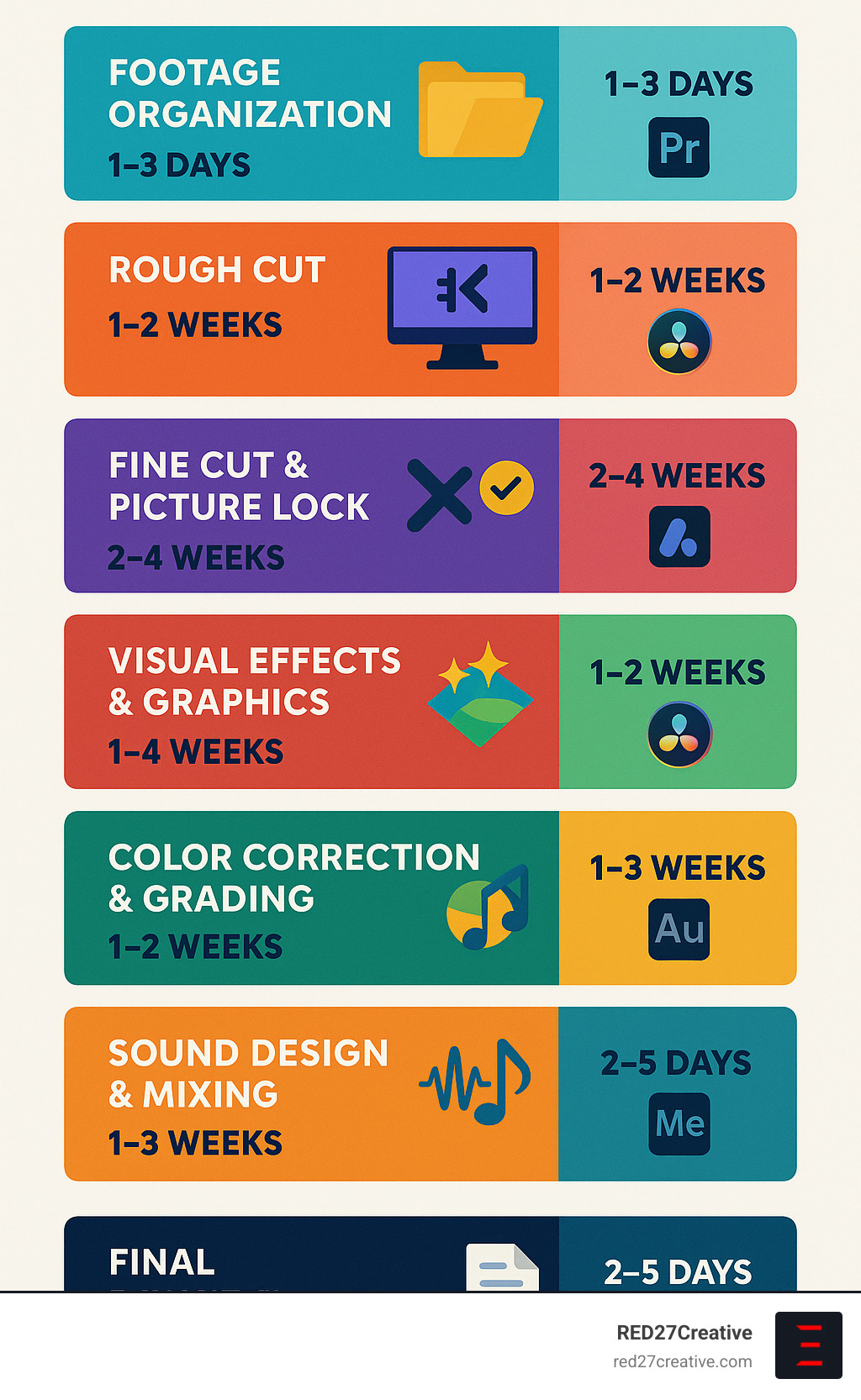
Here’s what video post production typically involves:
| Post-Production Stage | What Happens | Approximate Timeline |
|---|---|---|
| Footage Organization | Importing, backing up, and organizing raw footage | 1-3 days |
| Rough Cut | Initial assembly of selected clips in sequence | 1-2 weeks |
| Fine Cut & Picture Lock | Refined edit where timing and shot selection are finalized | 2-4 weeks |
| Visual Effects & Graphics | Adding CGI, motion graphics, text elements | 1-4 weeks |
| Color Correction & Grading | Ensuring color consistency and applying stylistic look | 1-2 weeks |
| Sound Design & Mixing | Cleaning audio, adding music, effects, and balancing sound | 1-3 weeks |
| Final Delivery | Adding titles/credits, quality checks, and exporting | 2-5 days |
Post-production is where the real magic happens. It’s the difference between raw, disjointed clips and a compelling story that captivates your audience. While filming captures the raw materials, post-production shapes those materials into something meaningful and impactful.
The length of post-production varies dramatically based on project complexity—from a few weeks for a simple marketing video to over a year for feature films with extensive visual effects. For most business videos, you can expect the post-production phase to take about as long as (or longer than) the planning and filming stages combined.
I’m Kiel Tredrea, founder of RED27Creative with over 20 years of experience overseeing video post production projects for businesses across multiple industries, ensuring that every frame tells your brand’s story effectively and authentically.
What is Video Post Production and Why It Matters
Video post production is where the real magic happens in the filmmaking process. It’s that wonderful creative space where raw footage transforms into a polished, cohesive story that truly connects with viewers. Think of it as the third act in your video creation journey, following pre-production (all that careful planning) and production (the actual filming).
I love how director Steven Bernstein puts it: “First you shoot the movie, then you make the movie.” This perfectly captures what post-production is all about—it’s where the actual creation of your final piece takes place. While your camera captures beautiful moments during filming, it’s in post-production where those moments become a narrative that genuinely touches people’s hearts.
Why does post-production deserve so much attention? Because it’s essentially the storytelling glue holding everything together. Even the most gorgeously shot footage falls flat without thoughtful editing, immersive sound design, and skillful color work. Post-production lifts your content from looking amateur to truly professional, creating that seamless viewing experience that keeps audiences engaged from start to finish.
It’s fascinating to note that Hollywood studio films spend an average of 301 days in post-production—nearly three times longer than the actual filming (which averages 106 days). Even for a simple two-minute marketing video, post-production typically accounts for about half of the total production timeline. This significant time investment speaks volumes about just how crucial this phase truly is.
Key Differences: Pre-Production vs Production vs Video Post Production
Understanding how post-production fits into the bigger picture helps clarify its unique and essential role:
Pre-Production is all about planning—developing concepts, crafting scripts, creating storyboards, scouting locations, casting talent, and preparing equipment. It’s essentially building the roadmap for what you’ll capture on camera.
Production is the filming phase where you’re recording raw footage according to your pre-production plan. This involves setting up cameras, lights, sound equipment, directing talent, and capturing all necessary shots.
Video Post Production is where change happens. Raw footage becomes a finished product through editing, visual effects, color grading, sound design, and more. As editor Cody Liesinger beautifully explains, “It’s up to the editor in post-production to explore the web that’s created and bring everything to the center.”
The key distinction is that pre-production and production focus on gathering materials, while video post production crafts those materials into something greater than the sum of its parts. It’s like the difference between having ingredients in your kitchen and creating a memorable meal that delights everyone at the table.
The Hidden Cost of Skipping Post-Production
Many businesses try to cut corners on post-production, but this approach often leads to bigger expenses down the road. Here’s what typically happens when you skimp on this crucial phase:
Poor Audio Quality is perhaps the most noticeable issue. As we often say in the industry, “Nothing makes a video worse than bad sound.” Viewers will forgive imperfect visuals, but poor audio immediately signals amateurism and causes people to click away.
Color Inconsistency creates a jarring viewing experience. Without proper color correction, shots taken at different times or under different lighting conditions won’t match, undermining the professional feel of your video.
Audience Drop-Off is a real concern. Studies consistently show that viewers make judgments about video quality within seconds. A poorly edited video leads to higher bounce rates and missed conversion opportunities for your business.
Reshoot Expenses often become necessary when post-production is rushed. Problems that could have been fixed in the edit (like minor continuity errors) might require expensive reshoots that blow your budget.
One of my favorite observations from a veteran post-production specialist sums it up perfectly: “When done correctly, no one should even realize any editing has been done.” That invisibility is the true hallmark of quality post-production—and it’s absolutely worth the investment for your brand.

The 8-Stage Video Post Production Workflow
Creating a masterful video isn’t just about what happens on set—it’s about the magic that unfolds afterward. A well-structured video post production workflow is your roadmap to success, guiding you from raw footage to a polished final product that captivates your audience.
Stage 1-2: Ingest & Organize Footage
Think of these first stages as building the foundation of your editing house—skip them, and everything else might collapse.
Stage 1: Data Management begins the moment filming wraps. Your first priority? Getting those precious files safely backed up. I always follow the industry’s golden rule: “If a file isn’t in three places, it doesn’t exist.” This means immediately transferring all footage to at least three separate storage locations—your computer, an external drive, and a cloud backup.
Don’t just copy and hope for the best. Use checksum verification to confirm your files transferred without corruption—nothing’s worse than finding damaged footage when you’re on a deadline! For smoother editing, especially with 4K+ footage, create proxy files (lower-resolution versions) that won’t bog down your computer.
Stage 2: Organization is where your future self will thank you. Take time to review all footage, adding descriptive tags, ratings, and notes about the best takes. Create a logical folder structure—whether organized by scene, shooting date, or content type—and stick to consistent file naming conventions. Using the ISO 8601 date format (YYYY-MM-DD) makes everything sort beautifully.
I once worked with a client who skipped this organization step, and their team spent three frantic days searching for a crucial interview clip before a major deadline. Don’t be that team!
More info about Photo and Videography
Stage 3-4: Rough Cut to Picture-Lock (video post production milestone)
With your digital ducks in a row, it’s time to start crafting your story through editing.
During Stage 3: Rough Cut, you’ll start by creating “selects” or “stringouts”—sequences of your best shots organized by scene or topic. Then comes the assembly edit, where you arrange clips according to your script or storyboard. This first pass isn’t about perfection—it’s about storytelling and structure.
As veteran film editor Vashi Nedomansky wisely advises: “Watch every frame twice; nurture the director relationship; stay organized; budget time for errors; try edits that shouldn’t work; focus on audio; cut in context of whole film.” This stage is about seeing the forest, not perfecting individual trees.
In Stage 4: Fine Cut and Picture Lock, you’ll refine timing, perfect transitions, and adjust pacing. This is when you’ll go through review cycles with stakeholders, implementing feedback until everyone’s happy. Then comes a crucial milestone: picture lock.
Picture lock means exactly what it sounds like—no more changes to the visual edit. The term comes from the days of physical film when the edit was literally locked to prevent changes. Today, it’s a workflow milestone that tells VFX artists, colorists, and sound designers they can start their specialized work without fear of wasting time on scenes that might disappear.
At picture lock, you’ll typically create an Edit Decision List (EDL), allowing you to apply your editing decisions from low-resolution proxy files to the original high-resolution footage—a technique that saves hours of rendering time.
Stage 5-6: VFX & Color (video post production artistry)
With your edit locked, it’s time for the visual magic to begin.
Stage 5: Visual Effects (VFX) transforms the ordinary into the extraordinary. This might include compositing (combining multiple images), adding motion graphics (animated text, logos), or integrating CGI with live-action footage. Even simple corporate videos often benefit from subtle VFX work—removing distractions from backgrounds or stabilizing shaky footage.
On larger productions, VFX supervisors work from rough-cut placeholders to fit visual effects into the storytelling flow. As one Game of Thrones VFX artist humorously noted, “Dragons in Game of Thrones… definitely not possible in real life.”
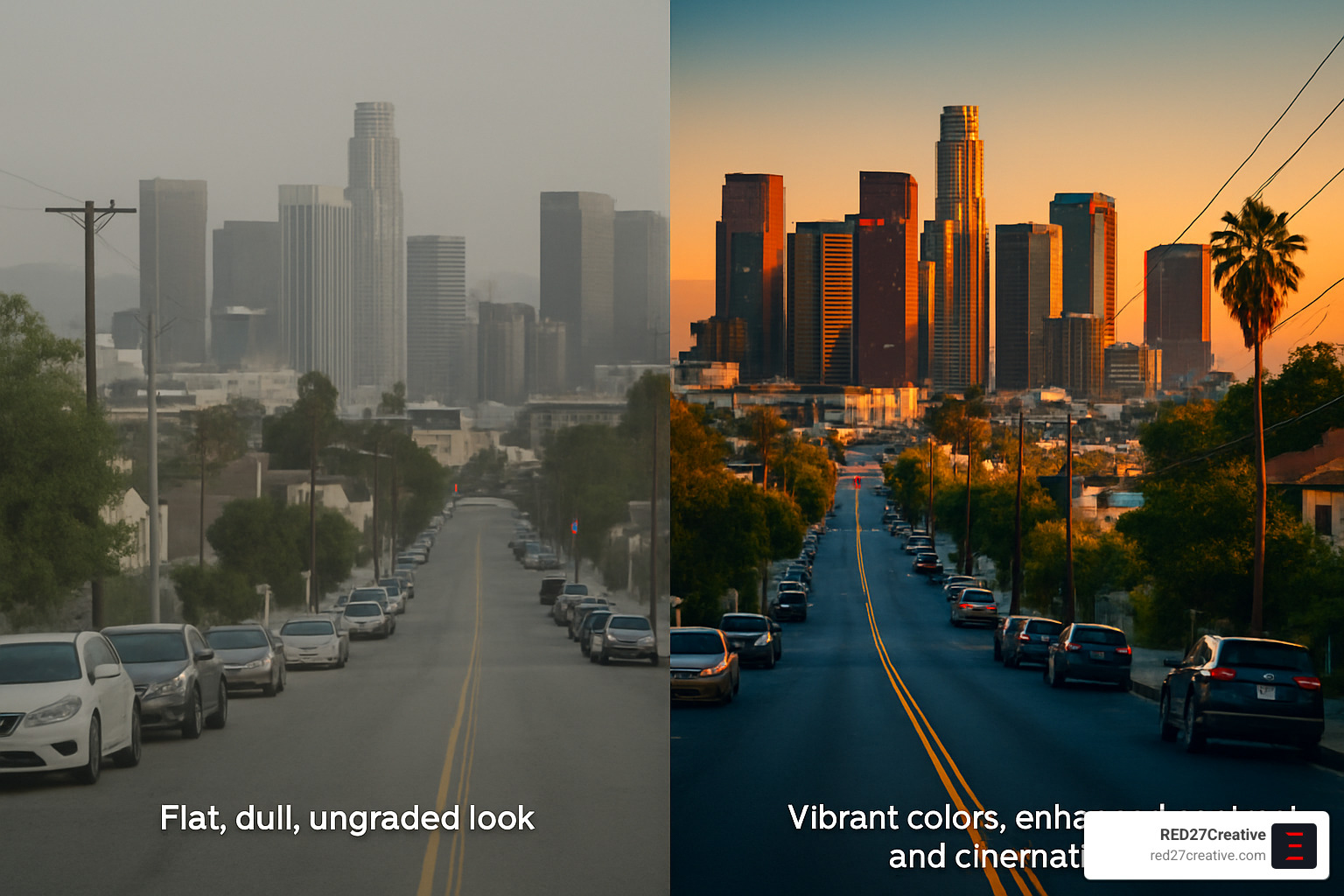
Stage 6: Color Correction and Grading might be the most underappreciated yet visually impactful stage of post-production. Color correction is the technical process that ensures consistency across shots—matching white balance and exposure so cuts between cameras feel seamless. Color grading is the artistic process that establishes mood and style—like the teal/orange look common in Hollywood blockbusters.
The psychological impact of color is profound. As one colorist explains, “A blue-tinted movie is associated with a cold atmosphere.” This makes color grading a powerful, subtle storytelling tool that can transform how viewers feel about your content.
Stage 7: Audio Sweetening & Mix
If viewers will forgive mediocre visuals, they’ll rarely tolerate poor audio. Sound quality often influences audience judgment more than image quality, making this stage crucial for professional results.
The audio post-production process transforms basic production audio into an immersive sonic experience. It begins with dialogue editing—cleaning up speech, removing background noise, and ensuring clarity. When production audio is unusable (perhaps due to unexpected construction noise or that barking dog that ruined a perfect take), ADR (Automated Dialogue Replacement) allows you to re-record dialogue in a controlled studio environment.
Foley work adds those everyday sounds we barely notice but subconsciously expect—footsteps, clothing rustles, door closes. Additional sound effects create atmosphere, while music establishes emotional tone. Finally, the mix balances all these elements for optimal listening across various devices.
As one sound designer told me, “Few people notice great audio—and that’s exactly what you strive for—but everyone will notice bad audio.” This invisible art form lifts your production in ways viewers feel rather than consciously recognize.
Stage 8: Titles, QC & Final Delivery
The final stage prepares your polished creation for its audience debut.
Start by adding titles and credits—opening sequences, lower thirds (identifying text), and closing credits that acknowledge everyone involved. Next comes Quality Control (QC), a meticulous check for technical errors, typos, or inconsistencies. As one QC specialist quipped, “It’s better to catch a stray coffee cup in QA than let audiences mock it forever”—a nod to a famous Game of Thrones oversight.
Finally, export and delivery creates final files in appropriate formats for your distribution channels. These specifications vary widely—theatrical release requires a Digital Cinema Package (DCP), broadcast television has strict technical requirements, and online platforms each have their own specifications.
For international distribution, you might need M&E (Music and Effects) tracks for foreign language dubbing, subtitle files, and various aspect ratios. Understanding delivery requirements early helps avoid costly rework and ensures your content looks and sounds its best wherever it’s viewed.
At RED27Creative, we’ve refined this workflow across hundreds of projects, ensuring each stage builds smoothly into the next for efficient, high-quality results that tell your brand’s story effectively.
Must-Have Tools & Software for Post Production Success
The right tools can transform your video post production journey from frustrating to flowing. Think of post-production software as your digital paintbrushes – each one designed for specific strokes of creative genius.
When it comes to editing software, you’ve got several powerful options to choose from. Adobe Premiere Pro remains the industry workhorse, beloved for its seamless integration with other Creative Cloud apps. Meanwhile, DaVinci Resolve has been turning heads with its incredible color grading capabilities and surprisingly robust free version. Mac enthusiasts often gravitate toward Final Cut Pro for its buttery-smooth performance on Apple silicon, while traditional broadcast and Hollywood productions still lean heavily on Avid Media Composer for its rock-solid stability.
“I’ve tried them all, but I keep coming back to Premiere for most client work,” shares one editor. “The Adobe ecosystem just makes it so easy to bounce between editing, motion graphics, and audio without missing a beat.”
For visual effects and motion graphics, Adobe After Effects continues to dominate the mid-range market. It’s the secret sauce behind countless YouTube intros, corporate animations, and even some Hollywood magic. For higher-end work, Nuke remains the compositing tool of choice for major studios, while Fusion (now included within DaVinci Resolve) offers a powerful node-based alternative.
Your ears deserve equal attention in post. Adobe Audition provides seamless audio workflow for Premiere editors, while Pro Tools remains the gold standard for dedicated audio professionals. Mac users often find Logic Pro hits the sweet spot for both music creation and sound design.
Color work can completely transform your footage, and DaVinci Resolve stands as the undisputed champion in this arena. For those who prefer staying within their NLE, Premiere Pro’s Lumetri tools have become increasingly capable, while plugins like FilmConvert offer quick ways to achieve cinematic looks across multiple platforms.
Don’t forget about collaboration tools – Frame.io has revolutionized the review process, allowing clients to leave time-stamped comments directly on your videos. Larger productions benefit from dedicated Media Asset Management (MAM) systems to keep everything organized.
Hardware & Workflow Accelerators
Even the best software crawls without the right hardware backing it up. Smart investments here can dramatically speed up your video post production workflow.
Storage might not be sexy, but it’s perhaps the most critical component of your post setup. RAID arrays provide both speed and data protection, while NAS systems enable team collaboration. For solo editors on the go, fast external SSDs have become game-changers, offering desktop-class performance in your pocket.
“External drives are notorious bottlenecks in video data transfer,” notes one seasoned editor. “I’d rather have slightly older computer components with blazing-fast storage than vice versa.”
Your computer’s specs matter tremendously in post. A powerful GPU accelerates everything from timeline scrubbing to final renders. RAM hunger is real in video work – 32GB serves as the practical minimum for professional projects, with 64GB+ becoming increasingly common. Multi-core processors allow for parallel processing of effects and exports, while NVMe storage dramatically speeds up system responsiveness and cache performance.
Don’t overlook the peripherals that can transform your workflow. A properly calibrated monitor isn’t just nice to have – it’s essential for ensuring your colors translate correctly across different screens. Control surfaces like the Loupedeck or Blackmagic Speed Editor can significantly accelerate color grading and editing tasks, while a Wacom tablet offers precision for rotoscoping and detailed VFX work.
Smart workflow techniques can be just as valuable as hardware upgrades. Proxy editing (working with lower-resolution versions of your footage) keeps things smooth even on modest systems. Enabling background rendering lets your computer work while you grab coffee. And never underestimate the power of keyboard shortcuts – mastering them can literally save you days of work over the course of a year.
Even modest hardware upgrades can yield significant time savings. As one post supervisor puts it: “Five minutes saved on each render adds up to hours by project end – time you could spend being creative instead of waiting.”
Leveraging AI & Modern Tech to Speed Up Editing
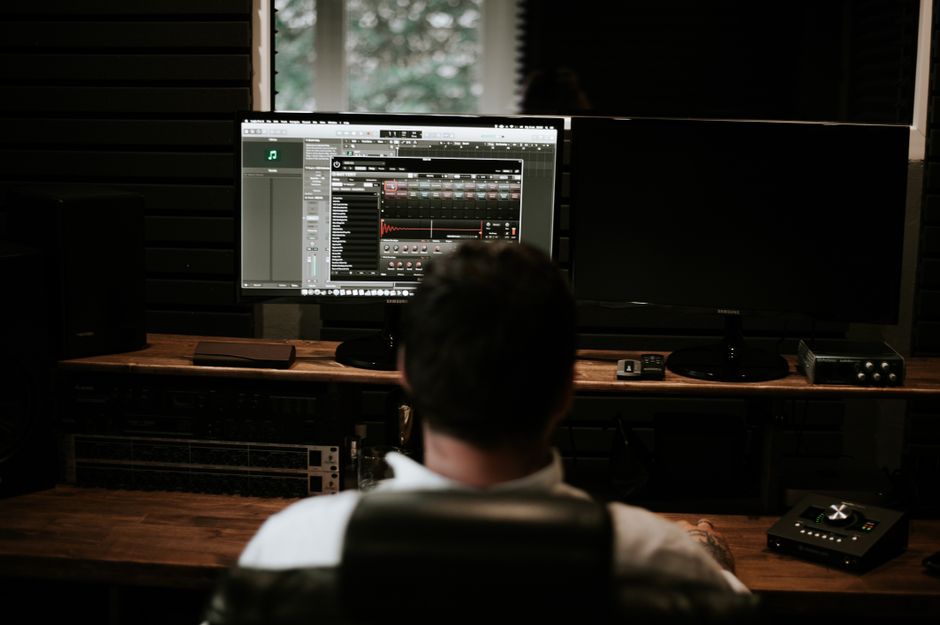
The editing room is getting a major upgrade these days, with artificial intelligence changing video post production in ways that would have seemed like science fiction just a few years ago. These smart tools aren’t replacing human creativity – they’re amplifying it by handling the tedious stuff that used to eat up hours of an editor’s day.
“I used to spend my mornings logging footage and creating transcripts,” says one veteran editor. “Now AI does that before I’ve finished my first cup of coffee.”
Today’s AI assistants are like having a super-efficient intern who never needs sleep. Content-aware fill technology can magically remove unwanted objects from your footage – that boom mic that dipped into frame or the reflective crew member in the background? Gone in minutes instead of hours of painstaking frame-by-frame work. Smart reframing tools automatically adjust your cinematic 16:9 masterpiece into a vertical format for Instagram without awkwardly cropping your star’s face in half.
The audio side is seeing equally impressive advances. Speech-to-text algorithms now generate surprisingly accurate transcripts and captions, making your content more accessible while saving you from the mind-numbing task of manual transcription. AI noise reduction preserves crystal clear dialogue while scrubbing away background noise that would have ruined a take in the past.
Even color work, traditionally the domain of highly specialized artists, is getting an AI boost. Automatic color matching between shots creates consistency that used to require hours of careful adjustment, while AI-powered upscaling can breathe new life into lower-resolution footage with remarkable results.
But perhaps the biggest game-changer is in workflow automation. Cloud collaboration tools mean your editor in Chicago, colorist in Los Angeles, and client in New York can all work together in real-time. Advanced file transfer systems like MASV handle massive video files with ease, eliminating the dreaded “the file is too large to send” message that used to plague post-production teams.
Latest research on AI file transfer
Real-World Time Savings
These technological advances aren’t just cool – they’re changing production timelines and budgets in tangible ways. What used to take days now takes hours; what took hours now takes minutes.
Creating that first rough assembly edit – traditionally a 2-3 day process of reviewing footage, selecting the best takes, and placing them in sequence? AI-assisted tools can suggest a starting point in just a couple of hours by automatically detecting scene changes and even identifying the most compelling moments.
“My assistant and I used to block off our entire Friday for subtitle generation,” shares one post supervisor. “Now we run the footage through our AI system during lunch and spend the afternoon just reviewing and tweaking the results.”
The time savings extend to every corner of post-production. Object removal that once required tedious rotoscoping now happens with a few clicks. Color matching across an entire sequence – previously a 1-2 hour job – now takes as little as 15 minutes with AI assistance.
One documentary filmmaker put it perfectly: “Technology hasn’t changed what we do – it’s changed how much of it we can do. The tedious tasks happen in the background while we focus on the creative decisions that actually tell the story.”
The key is finding the right balance. As with any tool, AI works best when guided by human expertise. The most successful post teams use AI to handle repetitive tasks while reserving human creativity for the nuanced storytelling decisions that machines simply can’t make. After all, AI can identify a technically perfect edit point, but it can’t feel the emotional rhythm of a scene the way a skilled editor can.
When used thoughtfully, these technological advances don’t diminish the art of post-production – they lift it by giving artists more time to focus on what matters most: telling compelling stories that connect with audiences.
File Management, Backup & Collaboration Best Practices
Let’s face it—file management isn’t the glamorous side of video post production, but it’s absolutely essential. I’ve seen brilliant creative projects derailed by poor organization, and trust me, you don’t want to be frantically searching for that one perfect take at 2 AM when your deadline looms at dawn.
Good file management starts with consistent naming conventions. Using the ISO 8601 date format (YYYY-MM-DD) might seem fussy at first, but you’ll thank yourself later when your files automatically sort chronologically. A solid naming pattern might look like 2023-06-15_RED27_ProjectName_Scene05_v03—immediately telling you when it was created, who made it, what project it belongs to, and which version you’re looking at.
When it comes to keeping your work safe, follow what industry pros call the “3-2-1 rule”: maintain 3 copies of everything, stored on 2 different types of media, with 1 copy kept off-site. This isn’t paranoia—it’s insurance. As data management experts often say, “Schofield’s Second Law of Computing: if a file isn’t in three places, it doesn’t exist.”
Version control is your friend in post-production. Rather than overwriting your project file each time you save, use clear version numbering (v01, v02, v03) and keep a quick note about what changed between versions. Future you will be incredibly grateful when a client suddenly wants to “go back to how it looked last Tuesday.”
For teams working together, cloud-based review platforms have transformed how we collaborate. They allow for frame-accurate comments, approval workflows, and ensure everyone is looking at the same version. No more confusion from feedback on outdated cuts!
| Storage Type | Pros | Cons | Best For |
|---|---|---|---|
| Local Hard Drives | Fast access, no internet required | Limited redundancy, physical vulnerability | Daily working files |
| RAID Arrays | Speed, redundancy, large capacity | Cost, complexity, physical location | Primary production storage |
| Cloud Storage | Accessibility, automatic backup, sharing | Monthly costs, internet dependency | Collaboration, archiving |
| LTO Tape | Long-term stability, cost-effective per TB | Slow access, specialized hardware | Archival storage |
Organizing for Future Re-Edits
I once had to revisit a project from three years earlier, and the difference between good and poor organization was stark. The well-organized project took hours to resurrect; the poorly organized one took days of archaeological digging.
The secret to future-proofing your projects is thorough metadata management. Take a few extra moments to tag footage with descriptive keywords, add comments explaining special techniques, and include information about rights and permissions. This turns a potential nightmare into a straightforward task.
For larger productions, consider investing in Media Asset Management (MAM) software. These systems create searchable databases of your content and link related assets together, making it infinitely easier to find what you need years later.
Document everything about your project—creative decisions, technical specifications, software versions used, render settings, and export specifications. Keep detailed lists of music, stock footage, and other licensed elements so you’re not scrambling to figure out if you still have usage rights.
When archiving completed projects, include all necessary files to rebuild the project if needed. As one post-production veteran colorfully put it, “Organize your projects as if you’ll hand them off to someone who wants to make you look bad.” That’s a high standard, but it’s the right mindset.
At RED27Creative, we’ve learned these lessons through years of managing complex video post production projects. Our streamlined workflows ensure that even if you need to revisit a project months or years later, everything will be right where you’d expect to find it—saving time, money, and countless headaches.
Post Production Across Film, TV, Music Videos & Online Content
The world of video post production changes dramatically depending on what you’re creating. Whether you’re polishing a Hollywood blockbuster or crafting a 15-second TikTok, the core principles remain similar—but the execution, timeline, and priorities shift considerably.
Feature films represent the marathon of post-production. Taking anywhere from six months to over a year, film post-production emphasizes storytelling arcs, emotional resonance, and often involves extensive visual effects. The numbers tell the story: in 2016, Hollywood studio films spent a whopping 301 days in post-production—significantly longer than both pre-production (146 days) and actual filming (106 days) combined. This extended timeline isn’t just bureaucracy; it allows for multiple refinement cycles that lift the final product.
Television and episodic content, meanwhile, operates more like a well-oiled machine. With typical post timelines of 2-8 weeks per episode, TV production teams have mastered the art of parallel workflows. As one seasoned TV editor told me, “While I’m cutting episode 3, episode 2 is in sound mix, episode 4 is shooting, and episode 5 is being prepped.” This assembly-line approach keeps shows on schedule while maintaining consistent visual style across episodes—a crucial factor for audience retention.
Music videos occupy a unique space in the post-production landscape. With timelines typically ranging from one to four weeks, these projects often push creative boundaries with experimental techniques and heavy stylization. Unlike narrative content, music videos start with a completed audio track, allowing editors to build visual rhythms that complement the existing musical structure. Many post-production innovations actually begin in music videos before finding their way into mainstream film and television.
When it comes to online and social content, speed becomes the driving factor. With timelines compressed to days rather than weeks or months, social media editors focus on quick turnarounds and platform-specific optimizations. As one social content creator explained, “Short-form videos like Instagram Reels and TikToks offer a simple and effective way to connect with potential clients.” These formats demand post-production approaches custom for mobile viewing and ever-shrinking attention spans.
Adapting Workflows for Each Medium
Smart post-production professionals don’t just apply a one-size-fits-all approach across different media. They adapt their processes to match the specific demands of each format.
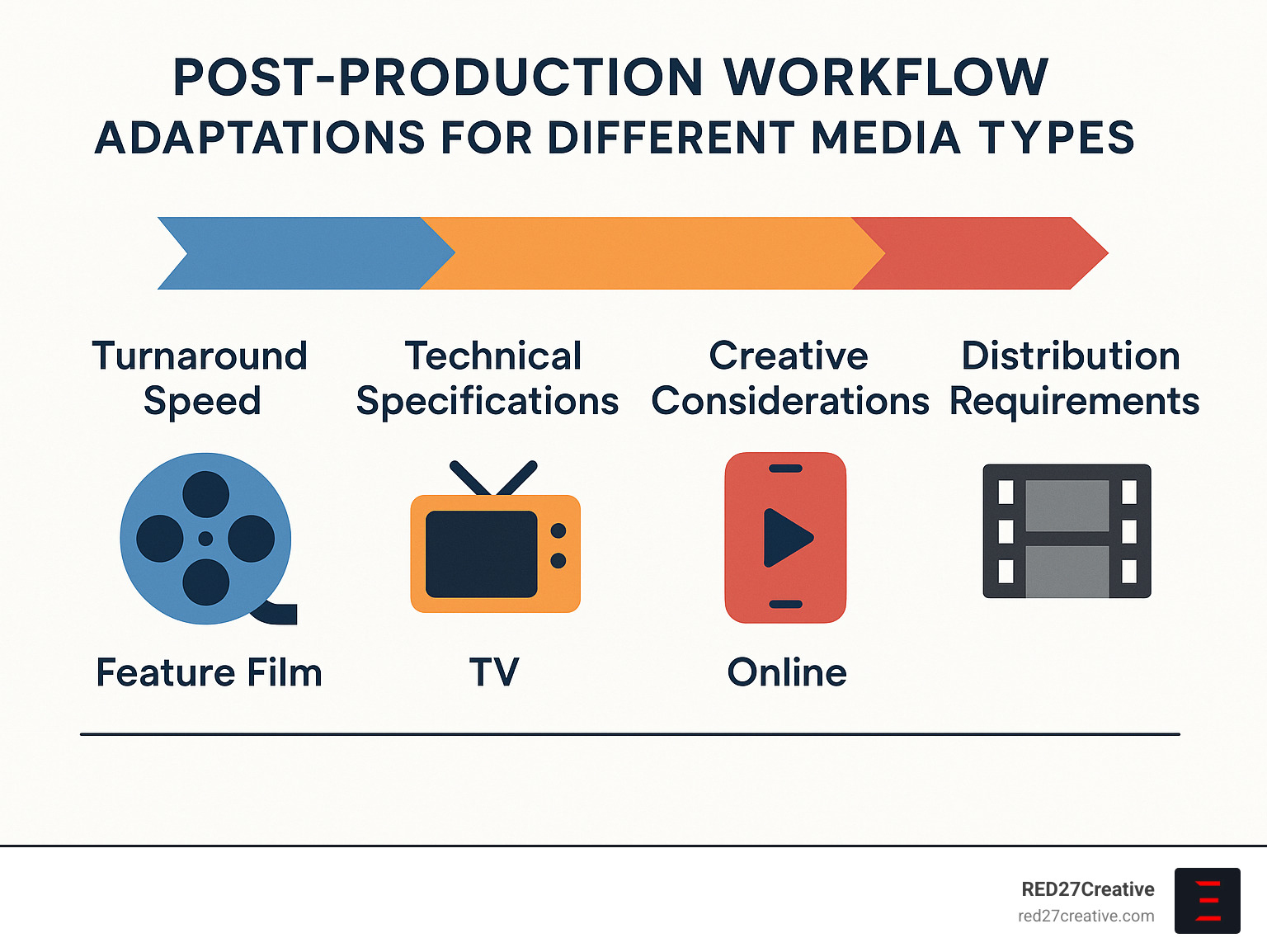
When it comes to turnaround speed, feature films allow for a methodical, quality-focused approach, while television requires more systematized efficiency. Online content often employs rapid, iterative processes where feedback and adjustments happen in near real-time.
Technical specifications vary wildly as well. Theatrical releases demand 4K+ resolution, wide color gamuts, and immersive sound design. Broadcast television must adhere to strict technical standards regarding loudness, color legality, and closed captioning. Online platforms each have their own specific requirements—what works for YouTube won’t necessarily work for TikTok or Instagram.
The creative considerations shift dramatically too. Long-form content must sustain narrative engagement over hours, while short-form pieces need to capture attention in seconds. Mid-length formats like TV episodes balance episodic storytelling with season-long arcs—requiring editors to think both about individual episodes and the broader narrative simultaneously.
“Understand your end platform before you start editing,” advises one post-production supervisor I spoke with. “A video destined for Instagram Stories requires fundamentally different decisions than one headed for YouTube or broadcast.” This platform-first thinking has become essential in today’s fragmented media landscape.
At RED27Creative, we’ve handled post-production across all these formats, giving us a unique perspective on how to adapt workflows for maximum impact regardless of your target medium. Whether you’re creating a polished corporate documentary or snappy social content, understanding the distinct requirements of your chosen format is the first step toward post-production success.
Roles & Professionals You Need on Your Post Team
Behind every polished video is a team of talented professionals working their magic. Video post production isn’t just about software and equipment—it’s about the people who know how to use them creatively and efficiently.
Think of your post team like a well-orchestrated band, with each member playing a crucial instrument. Let’s meet the key players who can lift your next video project:
The Editor is your storyteller-in-chief, the person who shapes your narrative by selecting the best footage and arranging it for maximum impact. They’re masters of pacing, emotional flow, and technical editing software. Even the smallest projects benefit from a skilled editor who can transform random clips into a cohesive story that resonates with viewers.
Working alongside them, the Assistant Editor handles the behind-the-scenes organization that makes everything run smoothly. They manage media files, sync audio, create proxies, and prepare materials for the editor. As one post supervisor told me, “A good assistant editor is worth their weight in gold—they prevent disasters before they happen.” For projects with lots of footage or tight deadlines, this role becomes essential.
The Colorist transforms the visual feel of your video through color correction and grading. They ensure consistency between shots and create the mood that supports your story—whether that’s the warm, nostalgic glow of a family brand or the cool, professional look of a corporate piece. One colorist I worked with described his job as “painting with light after the cameras stop rolling.”
Don’t underestimate the importance of your Sound Designer/Mixer. While viewers might forgive less-than-perfect visuals, poor audio immediately signals amateurism. These audio wizards clean up dialogue, create sound effects, balance music, and craft the entire sonic experience. As the saying goes in post-production circles, “Audio is 50% of the viewing experience but 90% of a bad video’s problems.”
For projects requiring visual magic beyond basic editing, a VFX Artist brings impossible ideas to life. From removing unwanted objects to creating entirely new environments, these digital artists blend technical skill with creative problem-solving. Even simple corporate videos often benefit from subtle visual effects work that viewers never consciously notice.
The Motion Graphics Designer specializes in animated text, logos, and graphic elements that explain complex concepts or reinforce your brand. They’re particularly valuable for educational content, product demonstrations, and videos that need to convey information visually.
Overseeing the entire process, a Post-Production Supervisor manages workflows, timelines, budgets, and team coordination. For complex projects with multiple specialists, this role ensures everyone stays on track and communicates effectively. They’re part project manager, part technical consultant, and part translator between creative and business concerns.
On smaller projects, you’ll often find professionals wearing multiple hats—maybe your editor also handles color and basic motion graphics. But as projects grow in complexity, specialized expertise becomes increasingly valuable. As one industry veteran put it, “Jack of all trades is fine for simple videos, but when the stakes are high, you want masters of their crafts.”
Collaboration Tips for a Seamless Finish
The best video post production happens when talented people work together seamlessly. Here are some field-tested strategies we use at RED27Creative to ensure smooth collaboration:
Clear communication prevents most problems before they start. Establish shared terminology, document decisions in writing, and use visual references whenever possible. One director I worked with would share a “mood board” of images and video clips at the beginning of post-production to ensure everyone understood the visual style she wanted.
Structure your feedback process to be specific and actionable. Use timecode references when commenting on specific moments, and try to limit revision rounds to prevent the dreaded “feedback fatigue” that can drain creativity. When clients provide conflicting feedback (it happens!), help them prioritize what matters most.
Technical handoffs need careful attention. Create detailed specifications for transferring files between team members, maintain consistent naming conventions, and always verify file integrity after transfers. Nothing derails a project faster than corrupted files or missing elements.
Foster creative collaboration by sharing reference materials early, establishing clear decision-making authority, and scheduling regular check-ins to prevent surprises. The best creative work happens in an environment of trust and open communication.
At RED27Creative, we’ve refined these collaboration practices while working with clients throughout Chicago, Geneva, Batavia, Aurora, St. Charles, Plainfield, Oswego, and Naperville. Our team approach ensures that every specialist contributes their unique expertise while maintaining a unified creative vision that tells your brand’s story effectively.
Post-production is ultimately about people working together to craft something greater than any individual could create alone. The technology keeps changing, but the human element remains at the heart of great video post production.
Frequently Asked Questions about Video Post Production
What is a “picture lock” and why can’t I edit after it?
Picture lock is one of those magical moments in video post production where your editing journey reaches a significant milestone. It’s when you decide the visual edit is complete and ready to move forward. Think of it like setting concrete—once it hardens, making changes becomes much more complicated.
When we “lock the picture,” we’re essentially promising the other departments that the timing, shot selection, and overall structure won’t change anymore. This matters because sound designers, composers, VFX artists, and colorists all build their work on the foundation of your locked edit.
I once worked with a client who insisted on swapping out a key interview segment after picture lock. What seemed like a simple change created a cascade of problems—the carefully crafted sound mix no longer synced properly, custom music cues fell in the wrong places, and we had to redo color grading for the new footage. As our post supervisor gently explained, “Lock the picture before incoming departments begin work to prevent costly revisions.”
If you absolutely must make changes after picture lock (it happens!), be transparent with your team about what’s changing and understand that it will impact both your timeline and budget. Sometimes the story needs what it needs, but going in with eyes wide open helps manage expectations.
How long does post-production take for a 5-minute marketing video?
For a typical 5-minute marketing video, video post production usually takes about 2-4 weeks from the moment footage arrives to final delivery. But as with most creative endeavors, the timeline can stretch or compress based on several factors.
Your post-production schedule might extend if your project includes complex visual effects (those product animations don’t create themselves!), requires several rounds of client revisions, or involves sorting through hours of interview footage. Special audio needs like original music composition or professional voice-over recording can also add time to the process.
On the flip side, having well-organized footage, a clear creative brief, and limiting revision rounds can significantly streamline the timeline. At RED27Creative, we’ve found that clients who come prepared with specific feedback and a single point of contact for approvals often enjoy faster turnarounds.
I always tell our clients across Chicago, Geneva, and Batavia to allocate at least as much time for post-production as they did for filming—and usually more. The magic happens in the edit, but magic takes time to conjure properly!
Which software is best for beginners learning video post production?
Diving into video post production software can feel like learning to fly a spaceship, but some options offer gentler learning curves than others. For beginners looking to get their feet wet, I have a few recommendations based on years of training clients throughout Illinois.
Adobe Premiere Pro strikes a nice balance between accessibility and professional capability. It’s like learning to drive in a car you can keep forever—you might not use all the features immediately, but you won’t outgrow it either. Plus, with Creative Cloud, you’ll have access to After Effects for motion graphics and Audition for audio work when you’re ready to expand your skills.
DaVinci Resolve offers incredible value with its free version that includes professional-level tools. The color grading capabilities alone are worth the download. The interface has a bit more of a learning curve, but there’s something deeply satisfying about mastering software that Hollywood colorists use daily—without spending a dime.
For Mac users, Final Cut Pro provides a more intuitive experience with its magnetic timeline that helps keep everything organized as you edit. Many of our clients in St. Charles and Aurora find it easier to grasp initially than other options.
If you’re just testing the waters, the free editors that come with your computer (iMovie or Windows Video Editor) can be good starting points before investing in professional software.
At RED27Creative, we often recommend starting simple—edit a short family video or social media clip first—then gradually tackle more complex projects as your confidence grows. We even offer training sessions for clients in Naperville and Oswego who want to handle basic editing in-house while leaving the more complex projects to our team.
Conclusion
Mastering video post production isn’t just about technical skills—it’s about changing raw footage into stories that move people. There’s something magical about watching disconnected clips evolve into a cohesive narrative that resonates with viewers on an emotional level.
The beauty of the post-production workflow we’ve explored is its scalability. Whether you’re creating a 15-second Instagram reel or a feature-length documentary, the same fundamental principles apply. The complexity might change, but the journey from raw footage to polished story remains consistent. By understanding this process, you gain not just technical knowledge, but true creative control over how your audience experiences your message.
Post-production is where your content finds its voice. It’s where pacing, color, sound, and visual elements come together to create something greater than the sum of its parts. In today’s content-saturated world, this polish makes the difference between content that’s merely seen and content that’s truly felt.
At RED27Creative, we bring these principles to life for businesses throughout Chicago and surrounding communities like Geneva, Batavia, Aurora, and St. Charles. Our team doesn’t just edit videos—we craft visual stories that align with your brand’s unique voice and goals. Whether you need product demonstrations that showcase features clearly, customer testimonials that build trust, or brand stories that create emotional connections, professional video post production lifts your content from ordinary to extraordinary.
We’ve seen how proper post-production transforms marketing effectiveness. A well-edited video with clean audio, consistent color, and thoughtful pacing doesn’t just look better—it converts better. Viewers stay engaged longer, remember your message more clearly, and are more likely to take action after watching.
Ready to see how professional post-production can transform your video content? Let’s talk about your next project and how our team can help your story shine through every frame, from the first cut to the final export.

Kiel Tredrea
https://red27creative.comTop Marketing Agency • Web, SEO & Leads • RED27Creative