Free Social Media Content Creation Template Downloads

Why Every Marketing Team Needs a Social Media Content Creation Template
A social media content creation template is a structured document — typically a spreadsheet, digital calendar, or project management board — that maps out every element of a social media post before it goes live. It covers everything from copy and visuals to platform, publish date, and approval status.
If you’re here for quick-access templates, here’s what you need to know:
Top free social media content creation template types available for download:
- Content calendar template – Plan posts by date, platform, and content pillar
- Post copy template – Pre-formatted fields for captions, hashtags, and CTAs
- Visual asset template – Platform-specific design files (Instagram, TikTok, LinkedIn, YouTube)
- Strategy template – Goals, audience personas, and content pillars in one document
- Reporting template – Track KPIs, engagement rates, and ROI in a reusable format
These templates are available free from platforms like Canva, HubSpot, Adobe Express, Hootsuite, and Notion — and we’ve rounded up the best ones below.
Here’s why this matters: most social media teams don’t struggle because they lack ideas. They struggle because production is chaotic. Without a repeatable system, every post becomes a last-minute scramble. Templates fix that by turning reactive posting into a proactive, strategic workflow.
Over 250 free templates are available to help teams save hours each week. Tools like Hootsuite even allow bulk scheduling of up to 350 posts at once — a game-changer for busy marketing teams managing multiple channels.
I’m Kiel Tredrea, founder of RED27Creative and a marketing strategist with over 20 years of experience building performance-driven systems for B2B and service-based businesses — including developing social media content creation template frameworks that align content production with measurable lead generation goals. Below, I’ll walk you through exactly which templates to use, where to get them, and how to build them into a workflow that actually scales.
Important social media content creation template terms:
Essential Components of a social media content creation template
To move beyond “random acts of posting,” use a template as a strategic blueprint. A high-performing social media content creation template is a “single source of truth” that aligns daily tasks with long-term growth.
Start with content pillars—3–5 core themes representing your brand. For example, a Naperville business might use “Customer Success,” “Behind-the-Scenes,” and “Industry Tips” to keep the feed focused. Incorporate SMART goals (Specific, Measurable, Achievable, Relevant, Time-bound) and audience personas to ensure your copy resonates with your target demographic.
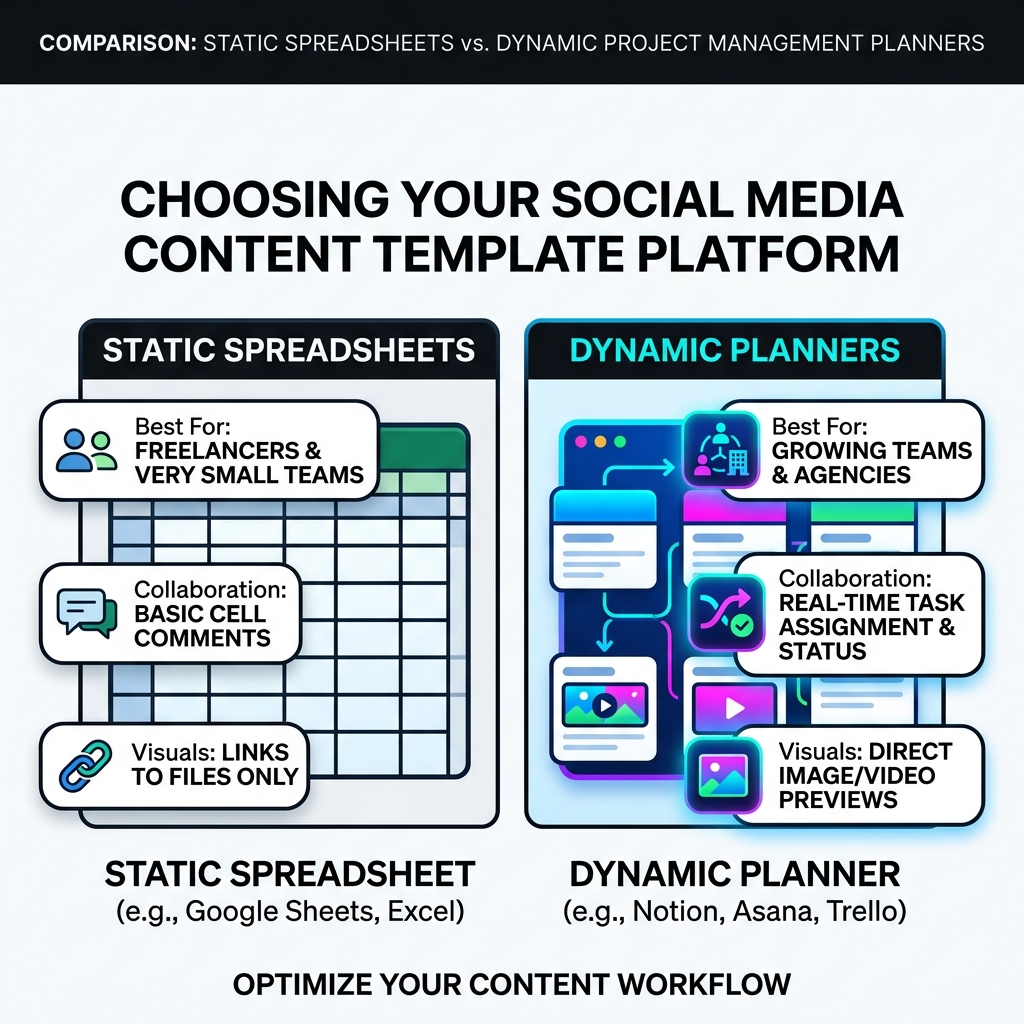
| Feature | Static Spreadsheet (Google Sheets/Excel) | Dynamic Planner (Notion/Asana/Trello) |
|---|---|---|
| Best For | Freelancers and small teams | Growing teams and agencies |
| Collaboration | Basic cell comments | Real-time task assignment |
| Visuals | Links to files only | Direct image/video previews |
| Flexibility | Manual formatting | Multiple views (Calendar, Board) |
| Automation | Limited | High (notifications, recurring tasks) |
Following social media content plan best practices means choosing a tool your team will actually use daily.
Must-Have Columns for Your Template
A functional template needs specific data points:
- Publishing Date & Time: Essential for peak engagement.
- Platform Selection: LinkedIn, Instagram, TikTok, etc.
- Post Copy: Final captions including emojis.
- Visual Asset Links: Direct links to Canva or Dropbox.
- Approval Status: “Draft,” “In Review,” or “Approved.”
- Content Pillar: To ensure a balanced feed.
Early Impacts of AI on Productivity shows AI-assisted workflows are 12% faster. Adding AI fields like “Headline options” or “Image prompts” can further accelerate drafting.
Optimizing for Visual Platforms
Visual platforms require technical specs. When planning custom social media content, focus on:
- Aspect Ratios: 9:16 for Reels/TikTok, 1:1 or 4:5 for Instagram.
- Video Length: Based on current platform trends.
- Carousel Structure: Map the hook (slide 1) to the CTA (slide 10).
- Thumbnails: Dedicated columns for scroll-stopping covers.
Streamlining Multi-Channel Workflows with Design Templates
Managing content across 10+ social platforms can quickly become overwhelming without a unified dashboard. Modern adults use an average of 6.75 different social platforms each month, which means your audience is likely seeing you in multiple places. You want that experience to be seamless, not repetitive.
For Instagram Reels and TikTok, your template should prioritize the “hook”—the first 3 seconds of the video. For LinkedIn, focus on thought leadership and “power trigrams” (three-word combinations like “How to increase…”) that have been shown to boost engagement. YouTube banners and thumbnails require high-contrast text and clear visual hierarchy to stand out in a crowded “Recommended” sidebar.
Our social media video creation ultimate guide emphasizes that the production level of videos differs between platforms. Your template should reflect these nuances, ensuring you aren’t just cross-posting the same video without adjusting the format or tone.
Leveraging AI-Powered Features in Modern Templates
The rise of generative AI has transformed the social media content creation template from a static document into a dynamic powerhouse. Tools like Adobe Express and Canva now offer:
- Text-to-Image: Generate unique stock photos directly within your design template.
- Automated Resizing: One-click tools that turn an Instagram Story into a Facebook ad or a Pinterest pin.
- Bulk Scheduling: Uploading up to 350 messages at once via CSV files.
- Magic Eraser/Edit: Removing unwanted objects from photos to keep creative social media content looking professional.
By including AI-driven analytics as a core component of your template, you can uncover hidden audience trends and optimize your posting times based on real-world data rather than guesswork.
Maintaining Brand Consistency Across All Channels
Consistency is the bedrock of trust. If your Instagram looks like a neon party but your LinkedIn looks like a sterile law firm, your audience will feel a “brand disconnect.” Your template should include a section for your Brand Kit, including:
- Style Guides: Tone of voice (e.g., “authoritative but warm”).
- Color Palettes: Exact HEX codes for your brand colors.
- Typography: Which fonts to use for headlines versus body text.
- Logo Placement: Standardized rules for where your logo sits on branded social media content.
Strategic Implementation and Performance Tracking
A template is only as effective as its process. We recommend content batching—creating a month’s worth of content in one focused session to reduce context switching and maintain quality. Build an evergreen library for timeless posts like “How-to” guides or “Meet the Team” to ensure consistency even during busy weeks.
With over 5.66 billion active users according to Digital 2026 Analysis, you need approval loops. Set clear SLAs for reviews to avoid “revision hell.”
Step-by-Step Publishing Process
- Brainstorming: Generate 10–15 ideas based on pillars.
- Drafting: Fill in copy and CTAs in your template.
- Designing: Create visuals using platform-specific tools.
- Reviewing: Use “QA Gates” for links and voice.
- Scheduling: Use social media post scheduling to automate.
Measuring ROI and Engagement
Track metrics tied to growth rather than just vanity:
- Conversion Tracking: Leads from specific posts.
- Sentiment Analysis: Audience reaction.
- Engagement Rate: Actual interaction levels.
Using lead generation social media strategies ensures every post serves a business purpose.
Frequently Asked Questions about Social Media Templates
What is a social media content creation template?
A social media content creation template is a structured framework—often a spreadsheet or digital document—used to plan, design, and organize posts. It ensures all necessary elements, such as captions, hashtags, and visual assets, are prepared in advance to maintain a consistent and professional brand presence across multiple platforms.
How does a template improve social media ROI?
Templates improve ROI by significantly reducing the time spent on repetitive tasks, allowing teams to focus on high-level strategy. By ensuring brand consistency and enabling data-driven planning, templates help create higher-quality content that resonates with audiences, leading to increased engagement, better lead generation, and more efficient resource allocation.
What are the recommended image sizes for social media graphics?
Standard image sizes vary by platform to ensure optimal display. For 2026, Instagram posts should typically be 1080×1080 pixels, while Stories and Reels require 1080×1920 pixels. Facebook recommends 1200×630 pixels for shared images, and TikTok videos must be 1080×1920. Using templates with these preset dimensions prevents awkward cropping and pixelation.
Conclusion
At RED27Creative, we believe that digital growth isn’t about working harder—it’s about working smarter. By implementing a robust social media content creation template, you transform your social media from a time-sink into a lead-generating engine. We specialize in building these data-driven systems for businesses across Geneva, Batavia, Naperville, and the greater Chicago area.
Whether you need advanced SEO to get your content discovered or naperville social media management services to handle the daily execution, we are here to help you turn visibility into measurable success. Ready to scale? Let’s build a system that works as hard as you do.

Kiel Tredrea
https://red27creative.comTop Marketing Agency • Web, SEO & Leads • RED27Creative